PERFECT STOCK
Designing the inventory module of a workshop management software
Perfect Stock is the inventory module of Perfect, the internal platform designed for Nykel Auto, a car workshop that also makes and sells its own product line.
- YEAR
- 2026
- DURATION
- 8 weeks
- ROLE
- UX/UI Product Designer
THE PROBLEM
Nykel Auto tracks by hand the products it buys, makes, uses in the workshop and sells: notebooks, visual counts, word of mouth. The result: tracking errors, unexpected stockouts, undetected losses, and no visibility on consumption.
THE SOLUTION
A module that traces every product, alerts before a stockout and tracks every movement.
DASHBOARD
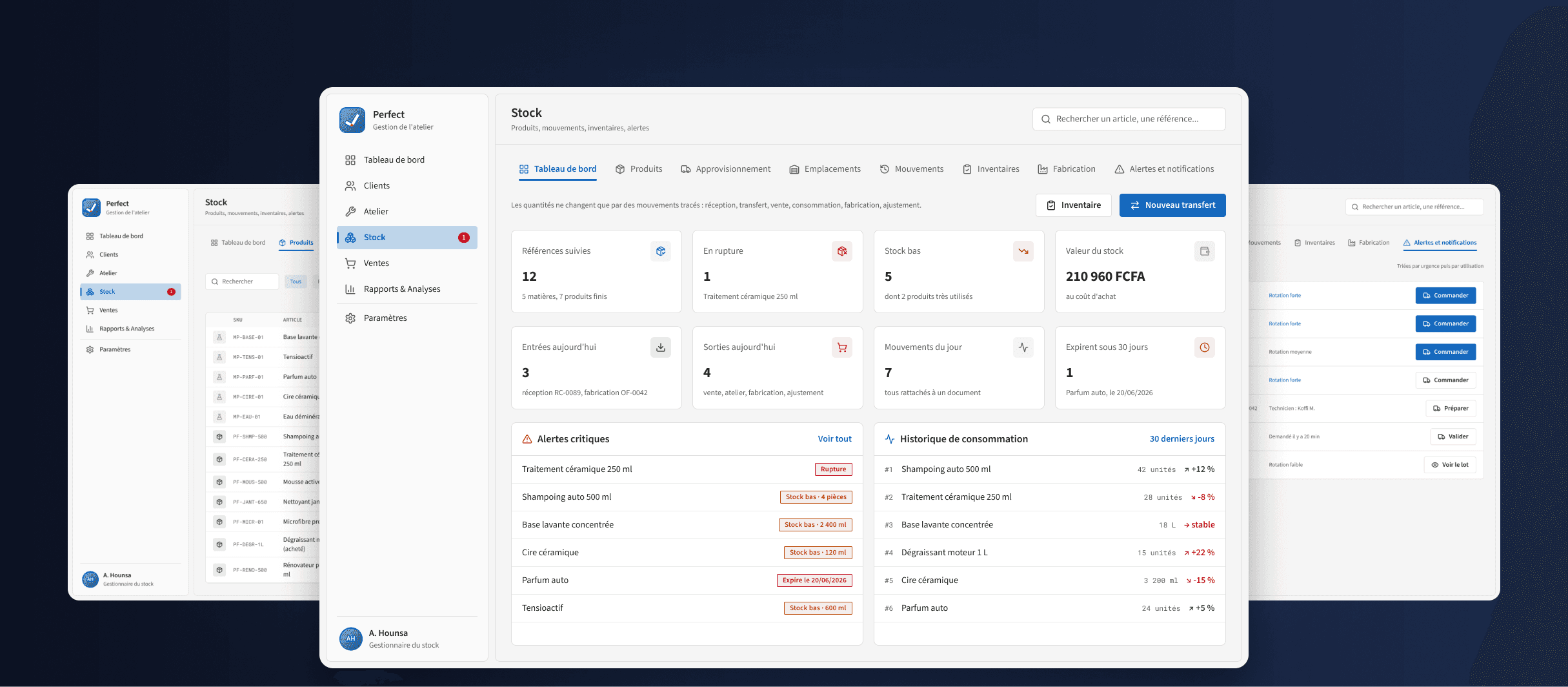
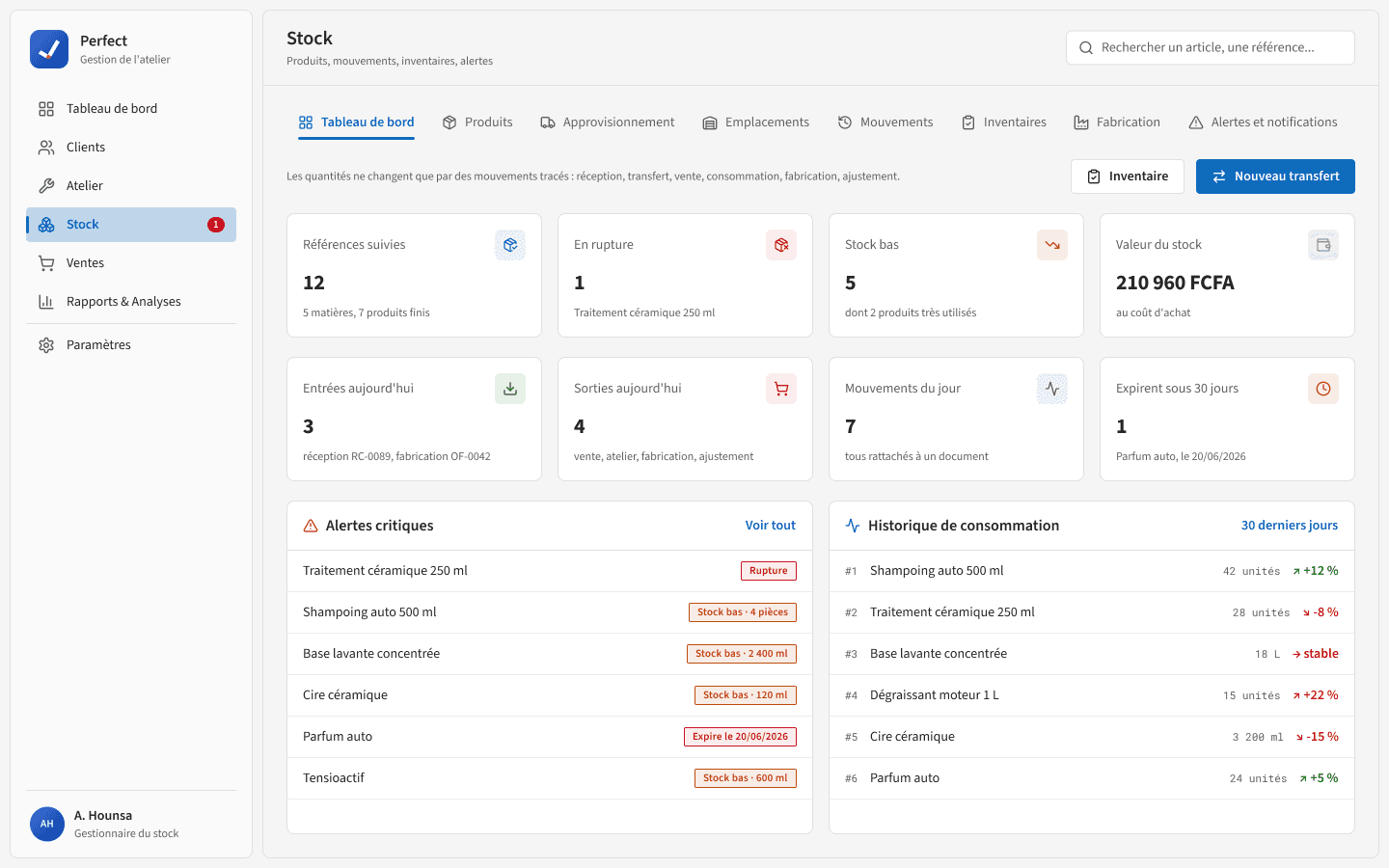
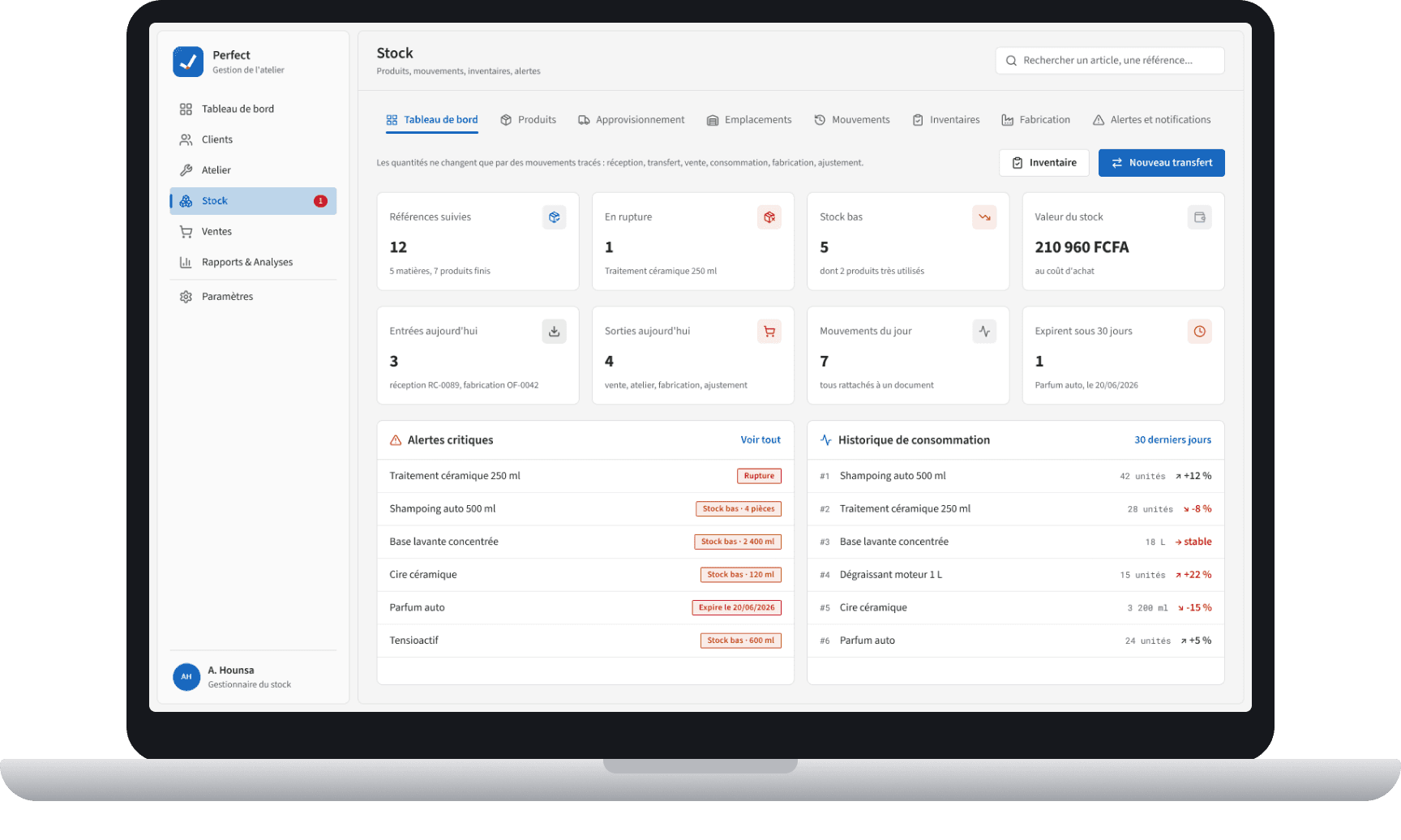
A real-time overview of the key indicators: total stock value, products on alert, recent movements and consumption history.
CONTEXT
Understanding the business context before designing
Nykel Auto is a car care and protection workshop based in Cotonou. It also makes its own product line (shampoo, snow foam, wheel cleaner…) and sells it over the counter. The stock therefore mixes raw materials, finished goods and purchased products, spread across the store, the workshop and the shop shelf: managing it has a direct impact on profitability and quality of service.
At first, I saw a simple need for digitalization. Conversations with the manager revealed a broader stake: anticipating stockouts and making every team member accountable.
“The problem isn't just counting products: you need to know who uses them, when, for which vehicle, and be warned before a stockout.”
My role: UX/UI Product Designer, working alone on the project for 8 weeks. I led the audit, the interviews, the prioritization, the architecture, the wireframes, the interfaces and the testing of Perfect's Stock module.
RESEARCH
Auditing Nykel Auto's existing process
To understand how things work today, I audited the existing inventory process: daily practices, the materials used and how information flows. Three problems stand out:
- Traceability: no reliable history of incoming and outgoing stock. Actual consumption per service cannot be tracked.
- Visibility: the manager has no real-time overview of the stock. Critical thresholds are only detected when the stockout actually happens.
- Accountability: there is no way to know who used what, when and on which vehicle.
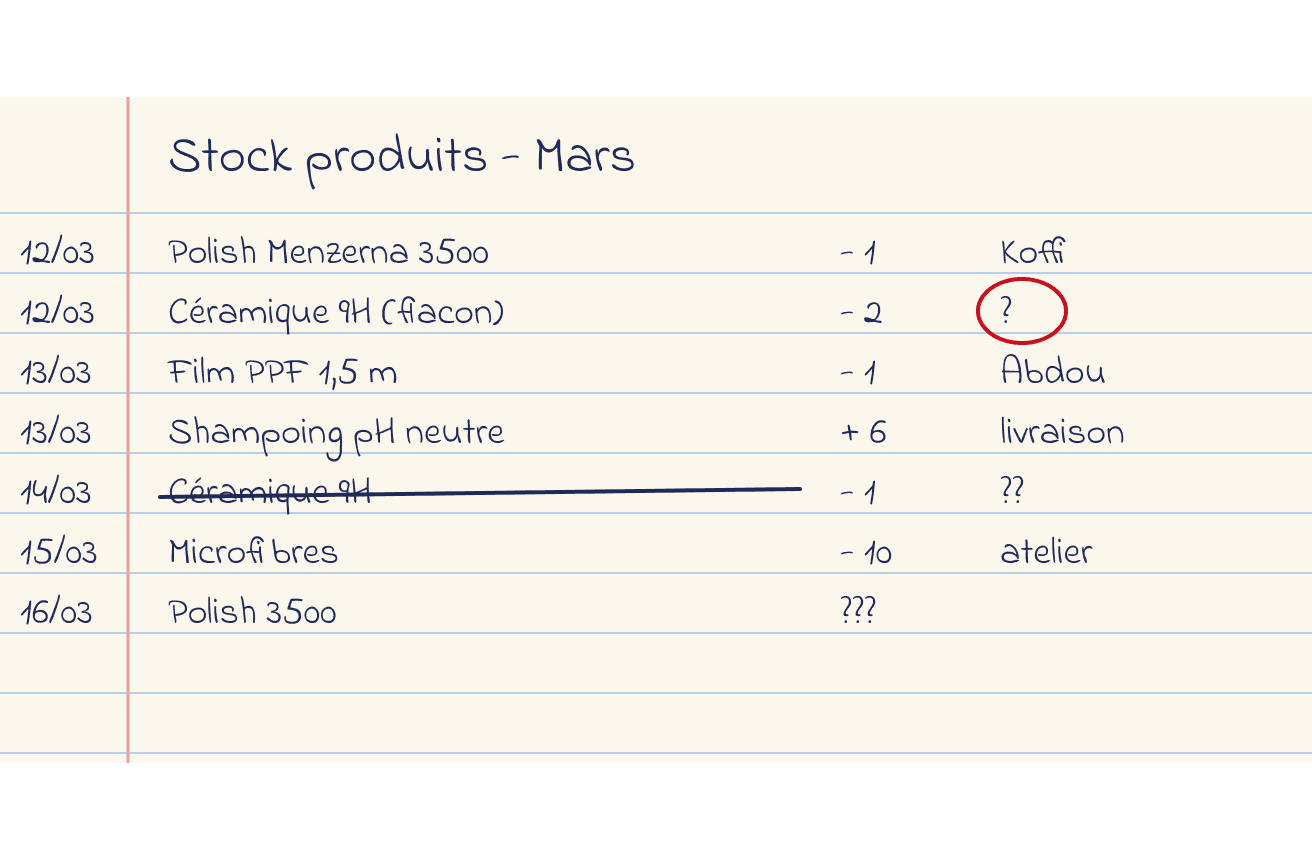
Current process (reconstruction)
Illustrations reconstructed from the audit: notebooks, visual counts and informal exchanges. They are not real documents.
NOTEBOOK
Outgoing stock is written down by hand, often without a person in charge or a clear quantity.
The manager's goals and the team's needs
After the audit, I interviewed the manager, then the team, to separate the company's goals from the needs on the ground.
Interview with the manager
I spoke with the manager to understand their needs and priorities for day-to-day inventory management.

Manager
Nykel Auto
Key points:
- Visibility: see the stock in real time, without a daily physical count.
- Traceability: know who used what, when and on which vehicle.
- Simplicity: a tool the whole team can use, without lengthy training.
Benchmark: four inventory tools
Criteria: simplicity, cost, traceability per vehicle, mobile use. The observations below remain assumptions to be checked tool by tool.

Sortly

StockItEasy

Odoo

Excel
Criteria
- Ease of use
- Cost for an SME
- Traceability per vehicle
Observations
- Sortly, StockItEasy: simple
- Odoo: complete but heavy
- Excel: flexible, unreliable
Implications
- Simple interface, in French
- Link every outgoing item to a vehicle
- Alerts with no setup
To check
- Current pricing
- Offline mode
- Actual use by the team
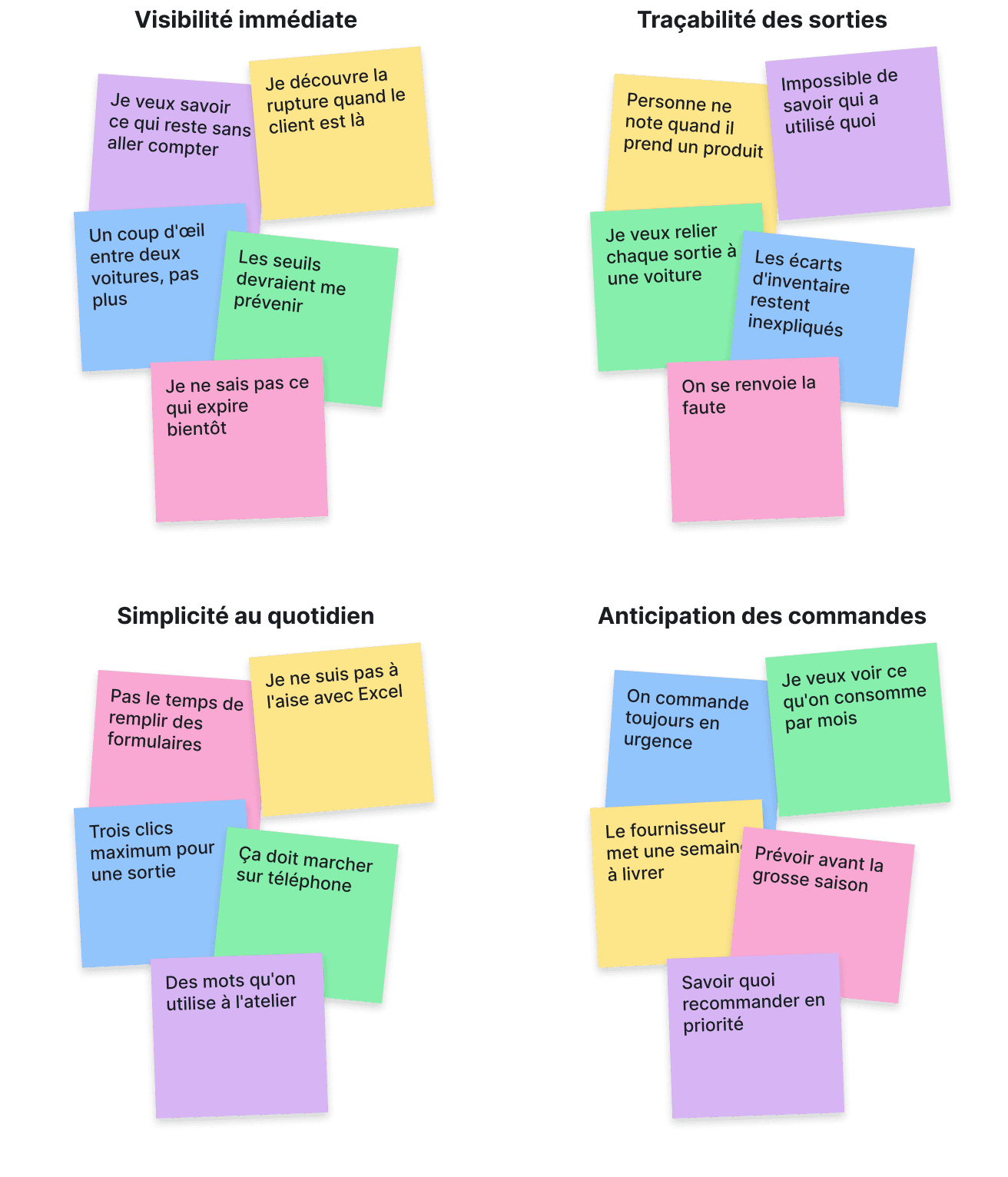
Interviews with the team
I interviewed the team about their needs, frustrations and habits. The sticky notes below summarize them.
DEFINE
Bringing the user to life
To make the research tangible, I synthesized the needs into a persona and a “How might we” question.
Persona: Abdoulaye, stock manager
A persona drawn from the interviews: wants to track products, anticipate stockouts and trace items leaving for the workshop.

Abdoulaye
Stock manager · synthetic persona drawn from the interviews
Core need: never again discover a stockout in front of the customer.
Role
- Manages raw materials, finished goods and purchases, supplier orders and items leaving for the workshop, all tracked in a notebook today.
Goals
- See stock levels in real time
- Anticipate orders before a stockout
- Know who used what and on which vehicle
Frustrations
- Long and unreliable manual counts
- Outgoing items rarely recorded
- Stockouts discovered in the middle of a service
Expectations of the tool
- Quick to check between two jobs
- Little data entry
- The workshop's vocabulary
How Might We
How might we help Abdoulaye track products in real time, anticipate stockouts and trace every movement, without adding to his daily workload?
IDEATION
Structuring the features of the inventory module
I prioritized the features by their impact on the workshop's daily routine and the estimated effort, then structured the module's architecture.
The goal was to design a complete but progressive module, starting with the essential features for the Nykel Auto team's daily work.
Features
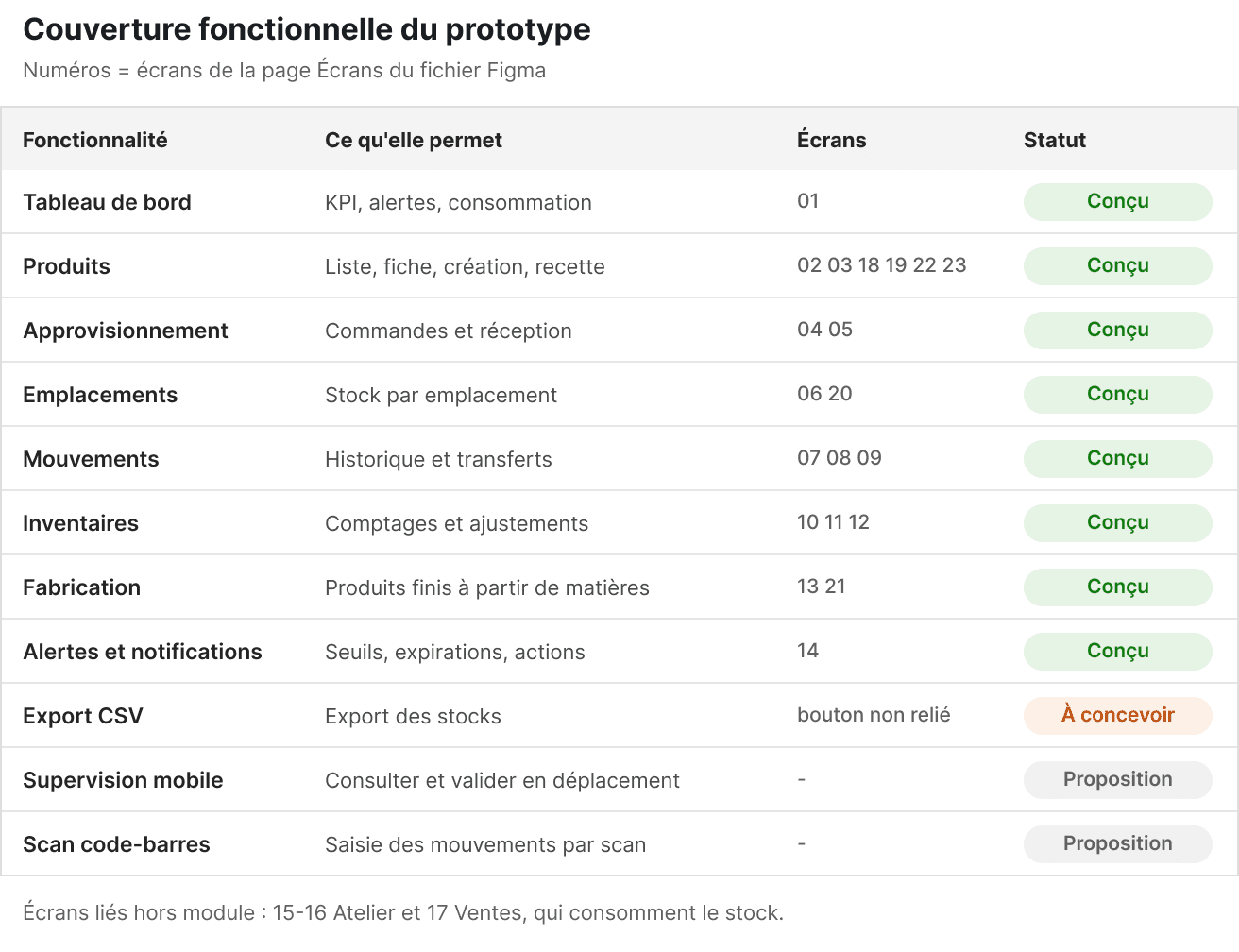
The prototype covers the eight tabs of the Stock module. The last three rows of the table are still to be designed.
From features to architecture
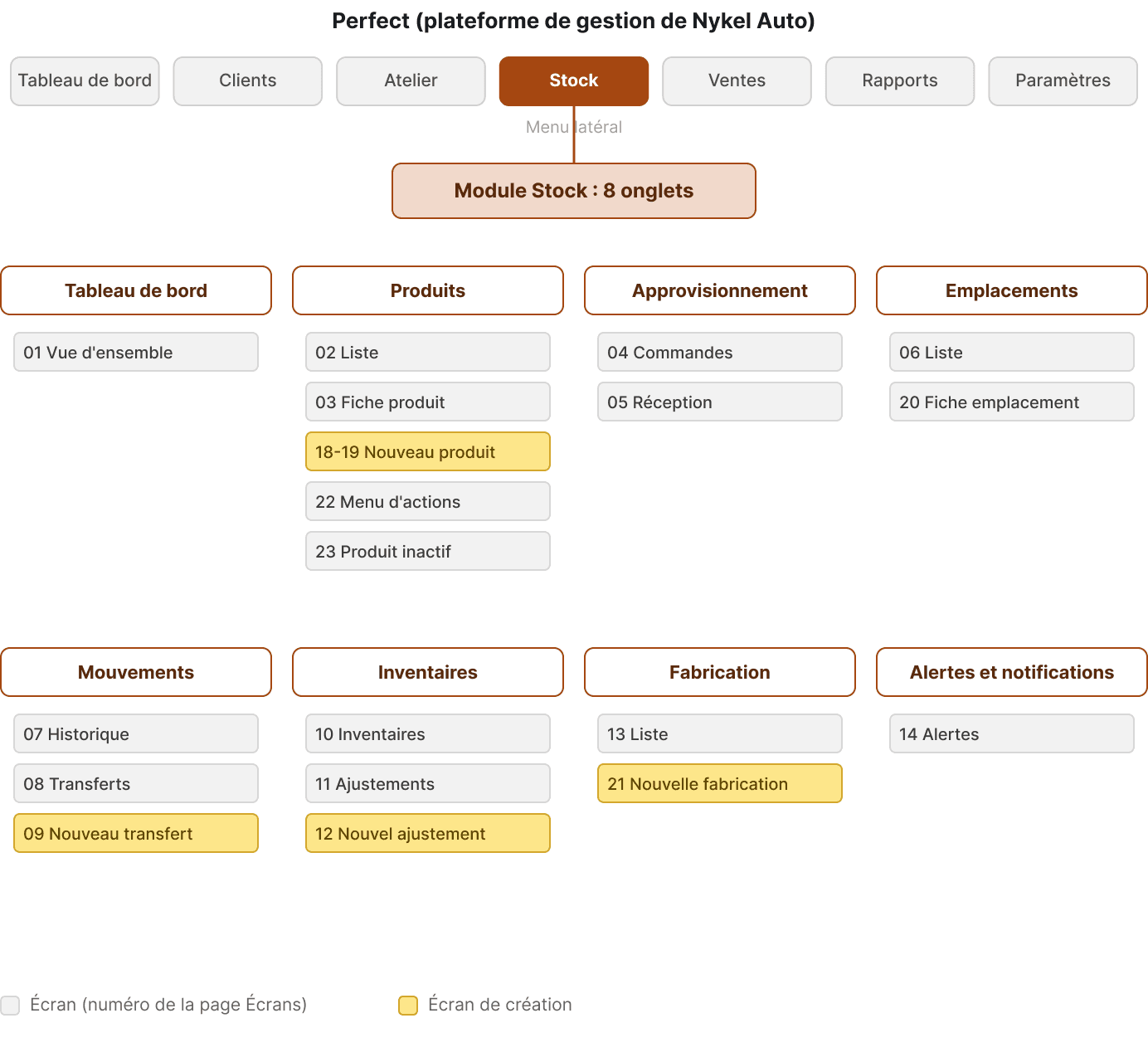
Perfect Stock is a section of the Perfect platform, reached from the side menu. It is organized into eight tabs: Dashboard, Products, Purchasing, Locations, Movements, Inventories, Manufacturing, Alerts and notifications.
DESIGN
From wireframes to high-fidelity design
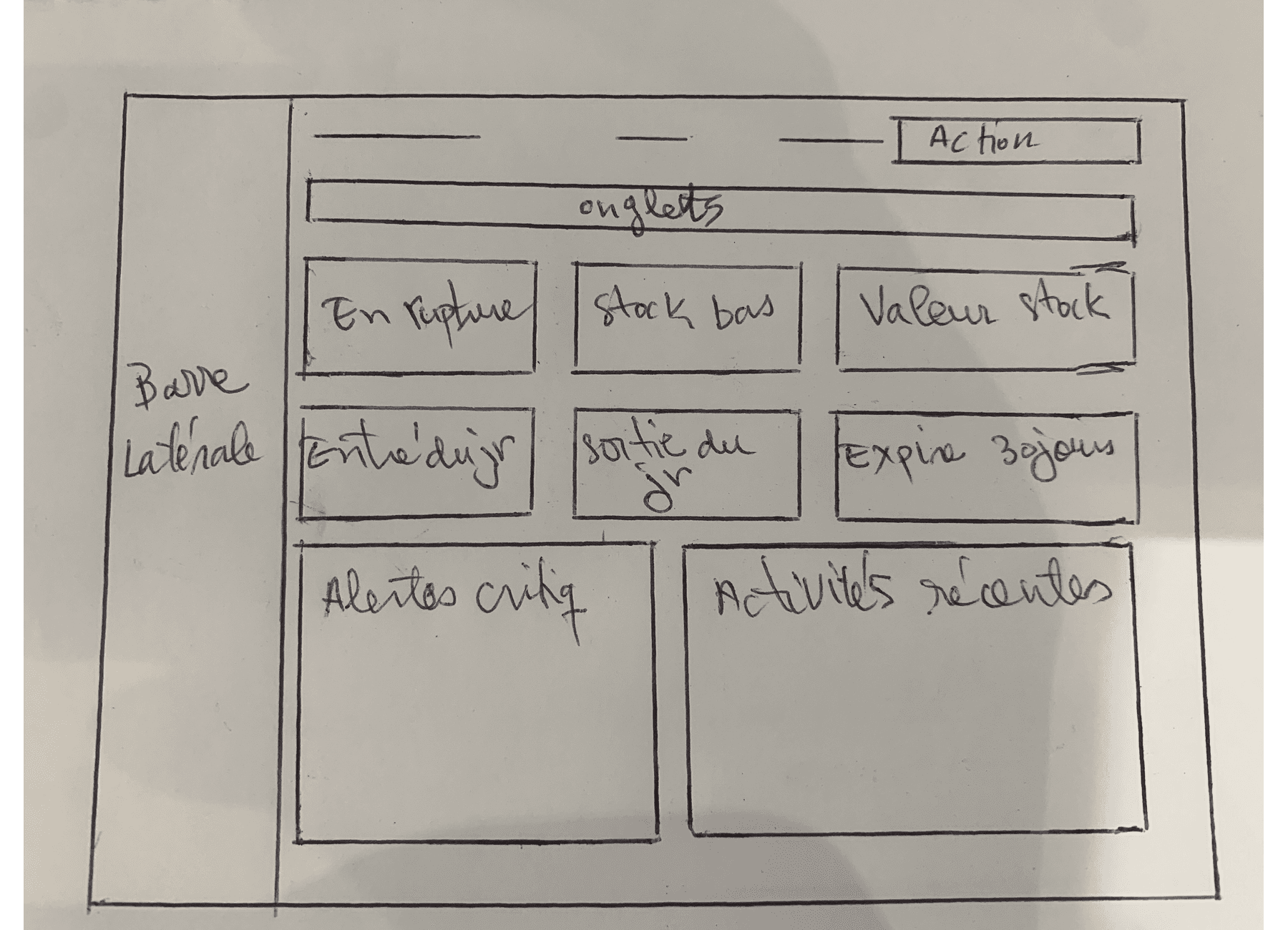
I first sketched the key screens on paper, then the wireframes set the hierarchy of each screen before the visual work. Each one answers a question asked by the screen, and each choice answers a finding from the audit:
- Stockouts discovered too late → critical alerts at the top of the dashboard
- Products hard to locate → Products, Locations and Inventories tabs
- Outgoing items never recorded → logging a movement in just a few fields
The wireframes started with nine tabs. Transfers were then merged into movements, adjustments into inventories, and purchasing took its place: the final module has eight.
PAPER SKETCH · DASHBOARD
A first hand-drawn draft: the day's indicators, critical alerts and recent activity.
A visual design rooted in the Design System
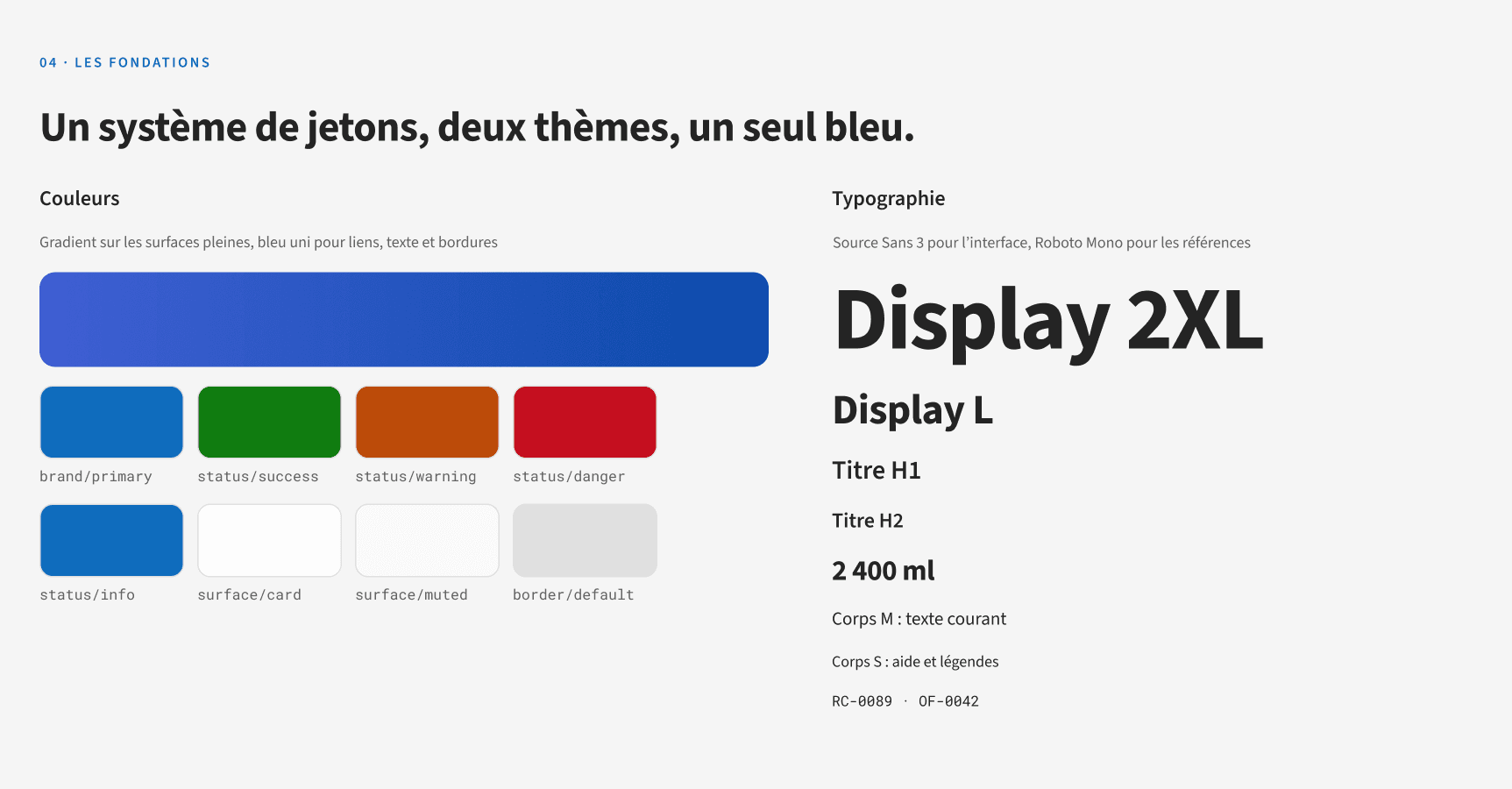
The module had to stay consistent with the Perfect platform. I reused its Design System: typography, semantic colors and components.
To meet expectations, I focused on:
- Readable typography: Source Sans 3 and Roboto Mono
- Status colors: green for OK, orange for low, red for stockout
- Clear components: KPI cards, tables, badges
The result is a functional and readable interface, designed to be used quickly between two jobs in the workshop.
TESTING AND ITERATIONS
Validating and improving with users
I ran moderated usability tests on the interactive Figma prototype with 5 participants.
Participants were asked to:
- Check a product's stock from the dashboard
- Record an outgoing stock movement for a service in progress
- Spot products at a critical threshold and place an order
Two problems observed led to the following iterations:
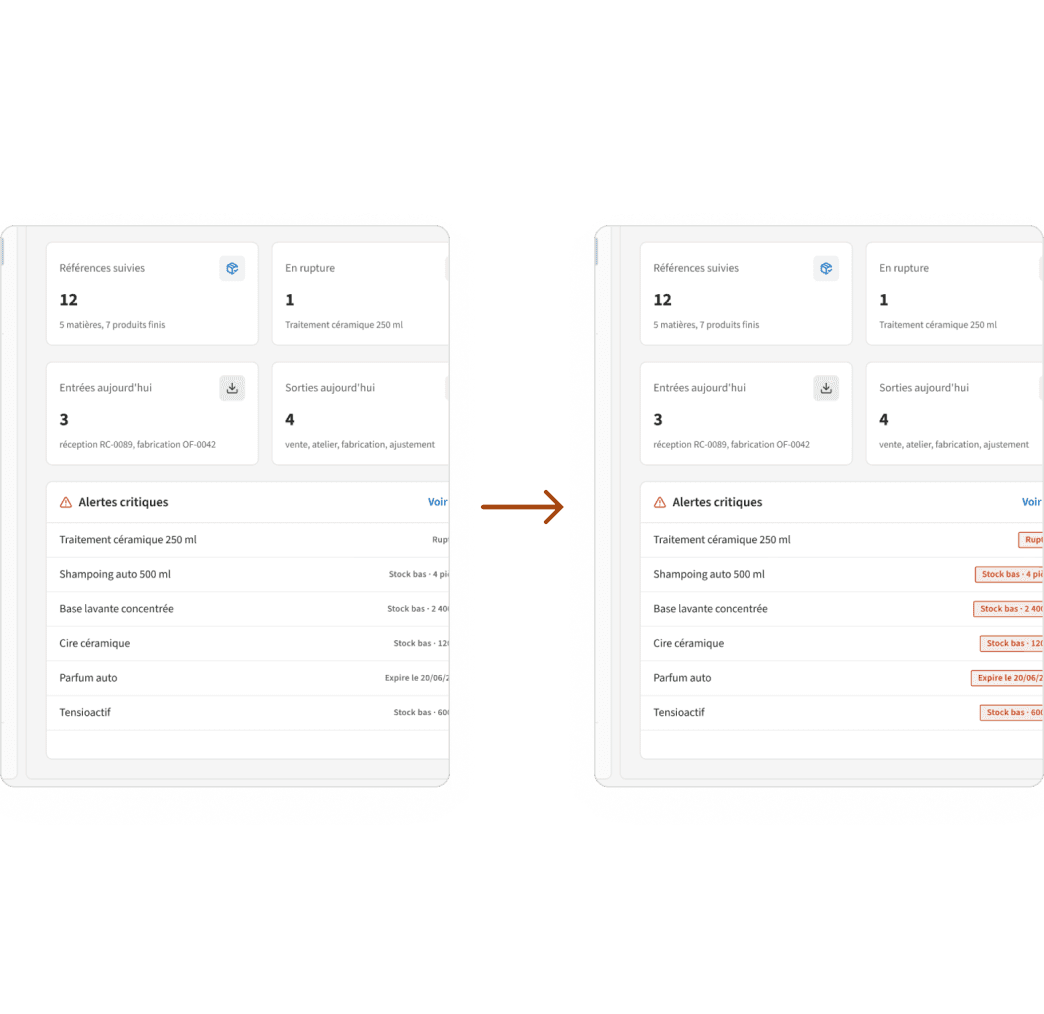
Making threshold alerts visible
- Finding: some participants did not notice the critical alerts on the dashboard.
- Final iteration: colored status badges (stockout, low stock) and a counter badge on the Stock menu.
Before (reconstructed)
After
Final design
FINAL THOUGHTS
Perfect Stock offers a prototype-tested answer to Nykel Auto's manual tracking.
What I learned: an inventory tool is only useful if it fits the workshop's rhythm. Testing early on a prototype revealed visibility problems I hadn't anticipated.
Next steps: after deployment, measure the stockouts avoided and the inventory time, then design mobile supervision, consumption forecasting and barcode scanning.
Limitations: tests run on a prototype with 5 participants, without quantified measurements; the two iterations still need to be validated by a new test. The actual effect on stockouts and inventory gaps remains to be measured after deployment.