MOOV MONEY
Moov Money, redesigned with voice
Redesign of the mobile money app and integration of Moov Assistant, a voice assistant that prepares transactions without ever deciding for the user.
- YEAR
- 2026
- ROLE
- UX/UI Product Designer
- PLATFORM
- iOS mobile
- FORMAT
- Concept project
THE PROBLEM
People use Moov Money every day to send money, pay, top up and buy bundles. But its home screen is organized like a catalog: balance, actions, services and ads compete for attention, and the recent transactions, which tell you whether the money has arrived, are pushed to the very bottom.
THE SOLUTION
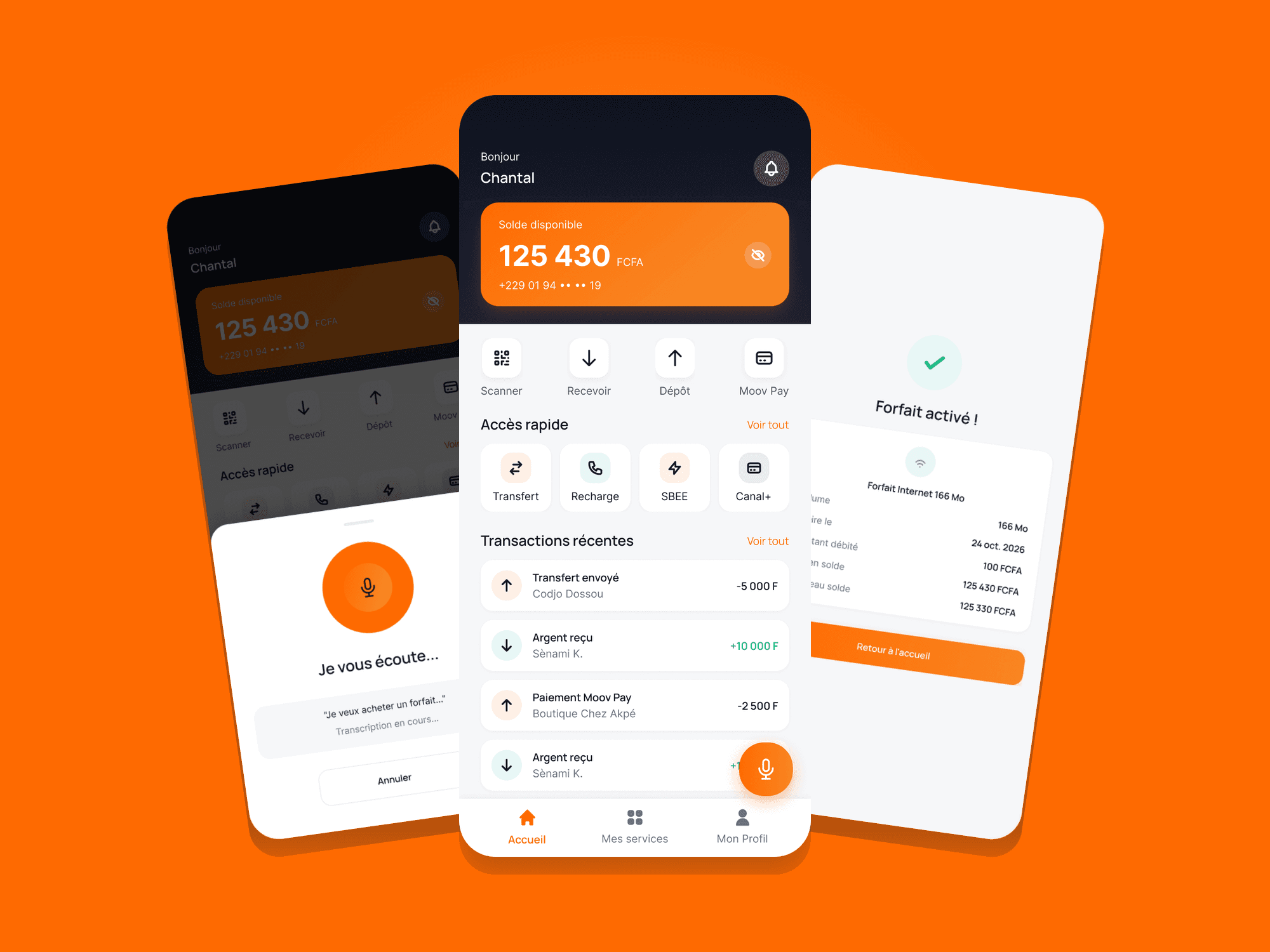
A home screen put back in order, and a voice assistant: voice prepares the transaction, the user approves it.
MOOV ASSISTANT
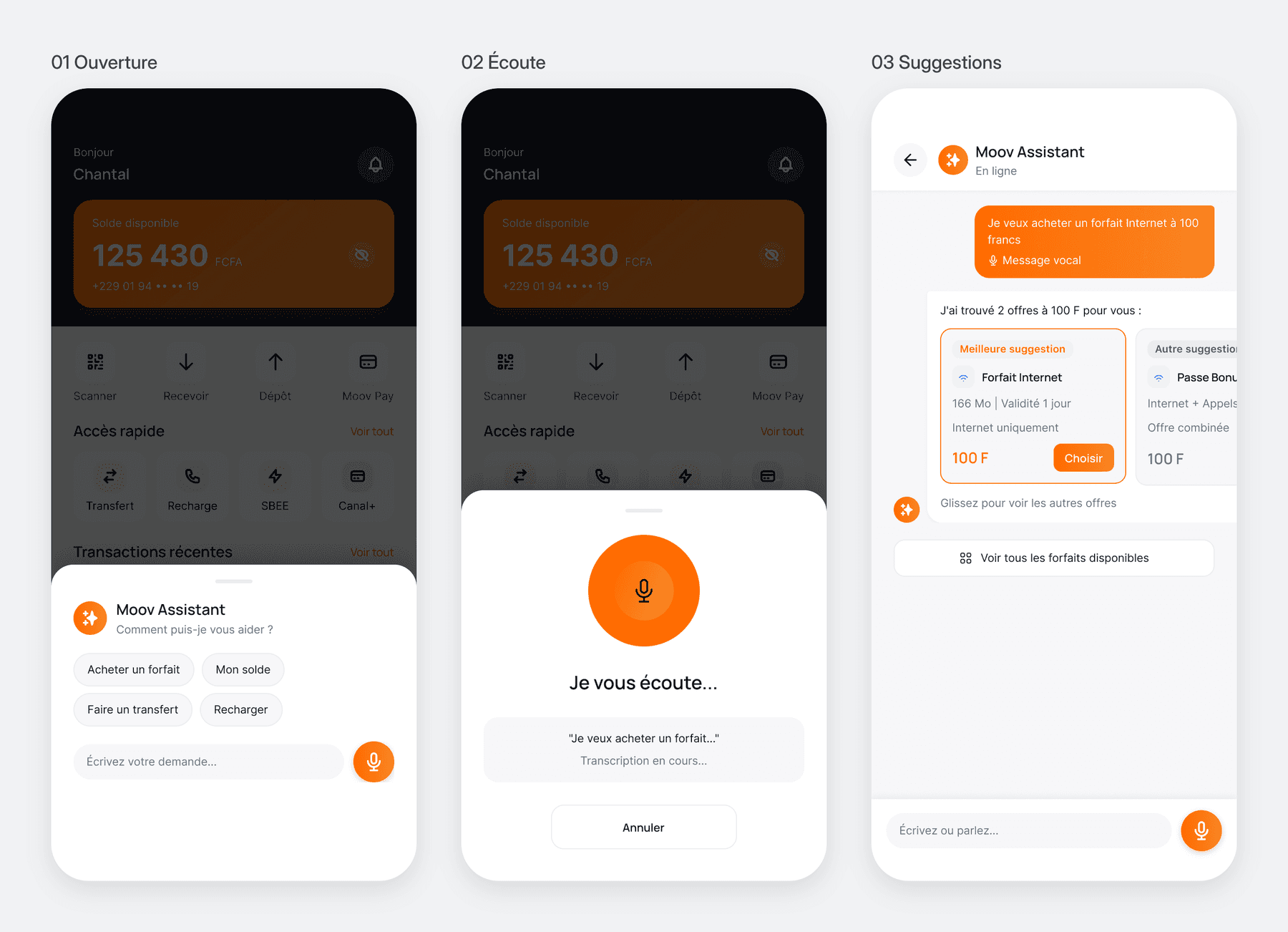
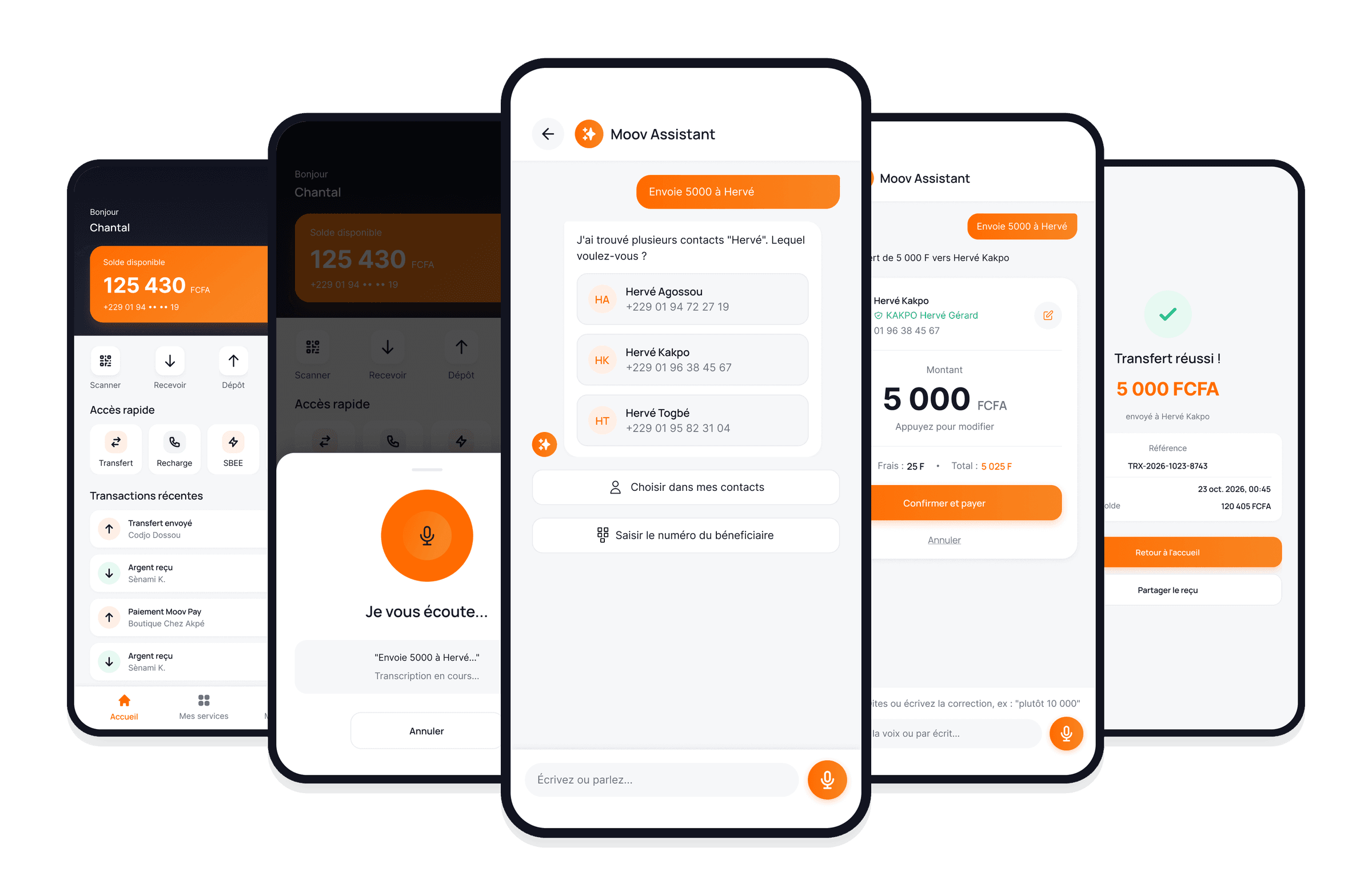
The floating button opens the assistant over the home screen: one-tap suggestions, a live transcription, then options to choose from.
CONTEXT
An app used every day, that wants to show everything at once
Moov Money is used to send money, pay, top up and buy bundles. The audit of the home screen reveals a clean interface, but one organized like a catalog, where balance, actions, services and ads compete for attention.
The project also raises a broader question: how do you integrate a voice assistant, Moov Assistant, into a financial app without it ever deciding for the user?
“Has my money arrived?”
My role: Product / UX / UI Designer, working alone on this concept project carried out in Benin in 2026, in Figma. I led the UX audit, the architecture, the user flows, the wireframes, the design system, the high-fidelity mockups, the interactive prototype and the test plan.
Note: a portfolio project, not affiliated with Moov Africa. The data shown is fictitious.
UX AUDIT
What the home screen audit revealed
I assessed the current home screen against four criteria, each scored out of 10. Information hierarchy gets the lowest score.
7/10
Experience (UX)
7.5/10
Interface (UI)
6.5/10
Information hierarchy
7/10
Efficiency of frequent tasks
Three problems, one strength
Confusing hierarchy
An oversized balance block, 7 services with the same visual weight, ads placed before the transactions.
Critical information too low
“Has my money arrived?”: people wonder after every transfer, yet recent transactions are at the very bottom.
Ambiguous labels
A vague “More” label, truncated names, and “My services” duplicated between the home screen and the navigation.
Worth keeping: the navigation
Three simple tabs (Home, My services, My profile): a strength not to break.
GOALS AND CONSTRAINTS
Saving time, without ever losing control
Three requirements guided every decision:
- 1
Simplicity
Fewer steps for frequent transactions, short and explicit labels.
- 2
Accessibility
Varied reading levels: short sentences, icons always labeled, WCAG AA contrast, 44 px touch targets. Voice helps, but is never required.
- 3
Trust and security
Amount, fees and recipient visible before payment. Explicit confirmation and PIN, every time.
How Might We
How might we help Moov Money users save time, by voice as well as by touch, without ever making them lose control of their money?
ARCHITECTURE AND FLOWS
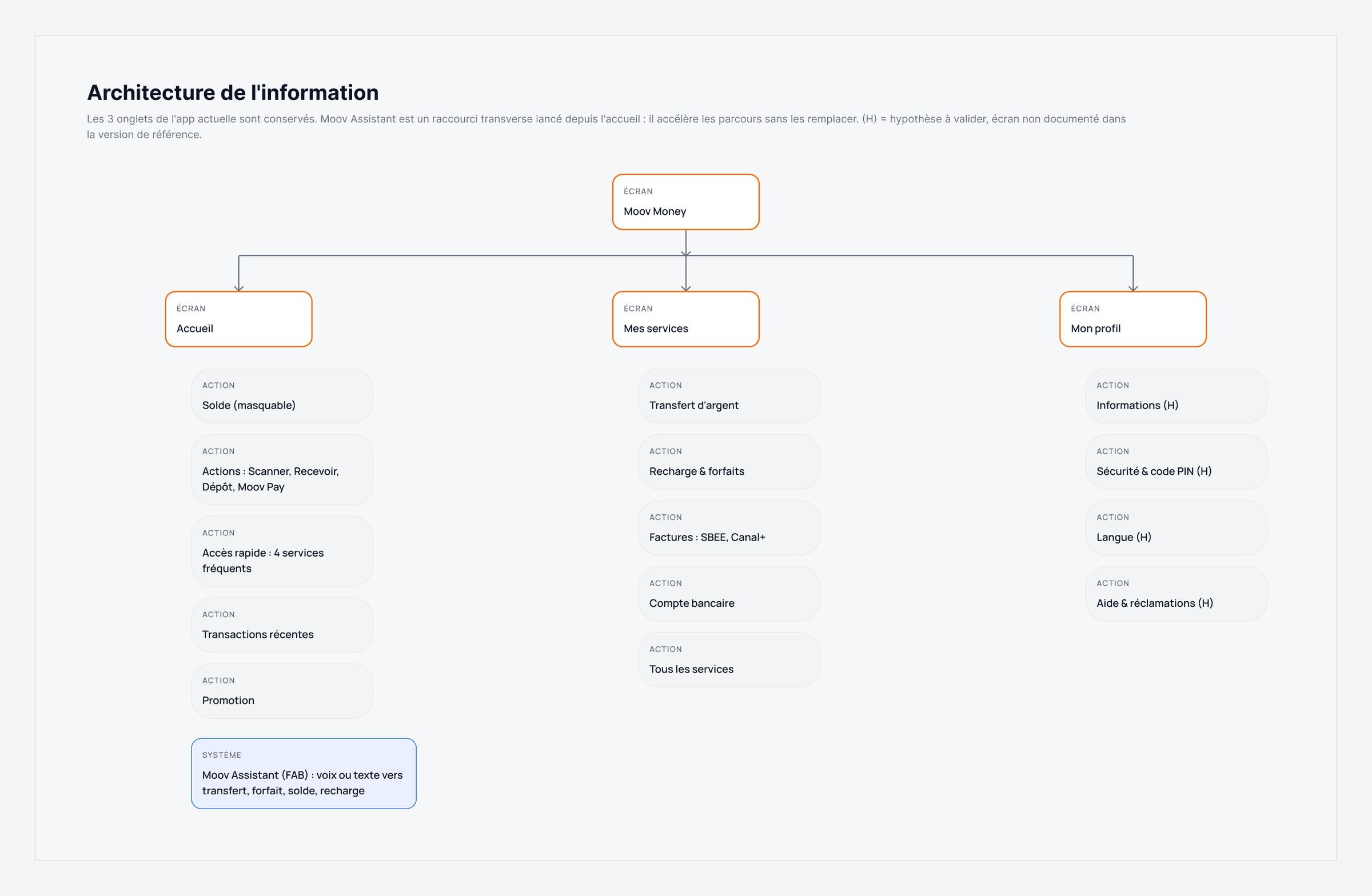
Keeping the 3 tabs, adding a shortcut
The 3 tabs of the current app are kept. Moov Assistant is a cross-cutting shortcut, launched from the home screen: it speeds up journeys without replacing them. Screens not documented in the reference version are marked as assumptions.
Three user flows, errors included
Voice transfer, standard transfer, buying a bundle: each flow describes the happy path and all its outcomes. The voice transfer, the most critical one, unfolds in five stages:
- 1
Launch
The floating button opens the assistant over the home screen.
- 2
Listen
The transcription appears live.
- 3
Clarify
Unclear intent or several contacts: the assistant asks a question.
- 4
Confirm
Verified name, amount, fees. Corrections by voice or with the pencil.
- 5
Approve
The PIN approves; only the operator's response sets the outcome.
EXPLORATION
Where should the assistant go?
Three options tested in low fidelity, against three criteria: visibility, effort to reach it, and respect for the money → action → verification hierarchy. The floating button wins.
A · Dedicated tab
Rejected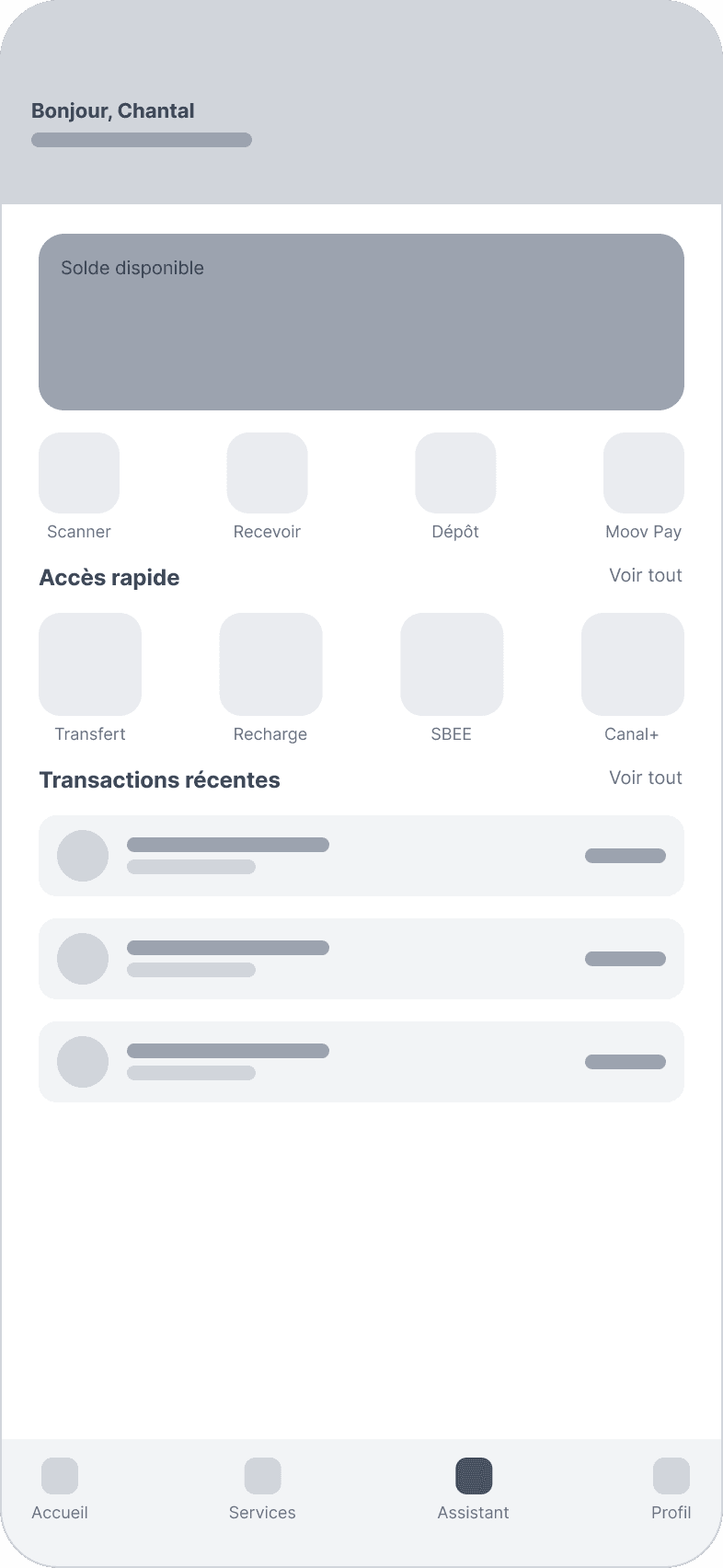
A 4th tab separates the assistant from the rest of the app: you have to leave the home screen to use it, and the 3-tab navigation disappears.
B · Floating button
Kept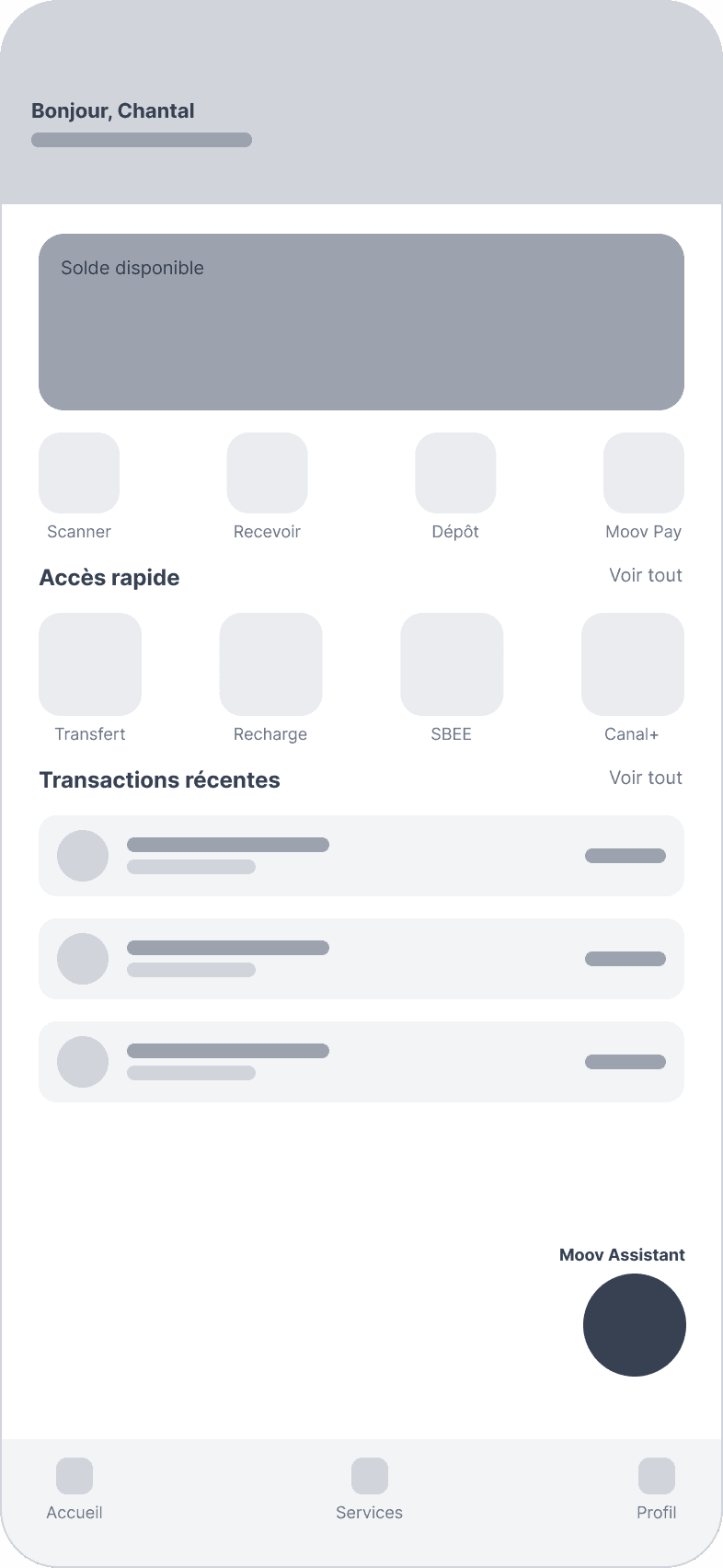
One tap from the home screen, within thumb reach, without breaking the hierarchy or the navigation. Watch out: it must not hide content, hence a button moved higher in high fidelity.
C · Command bar
Rejected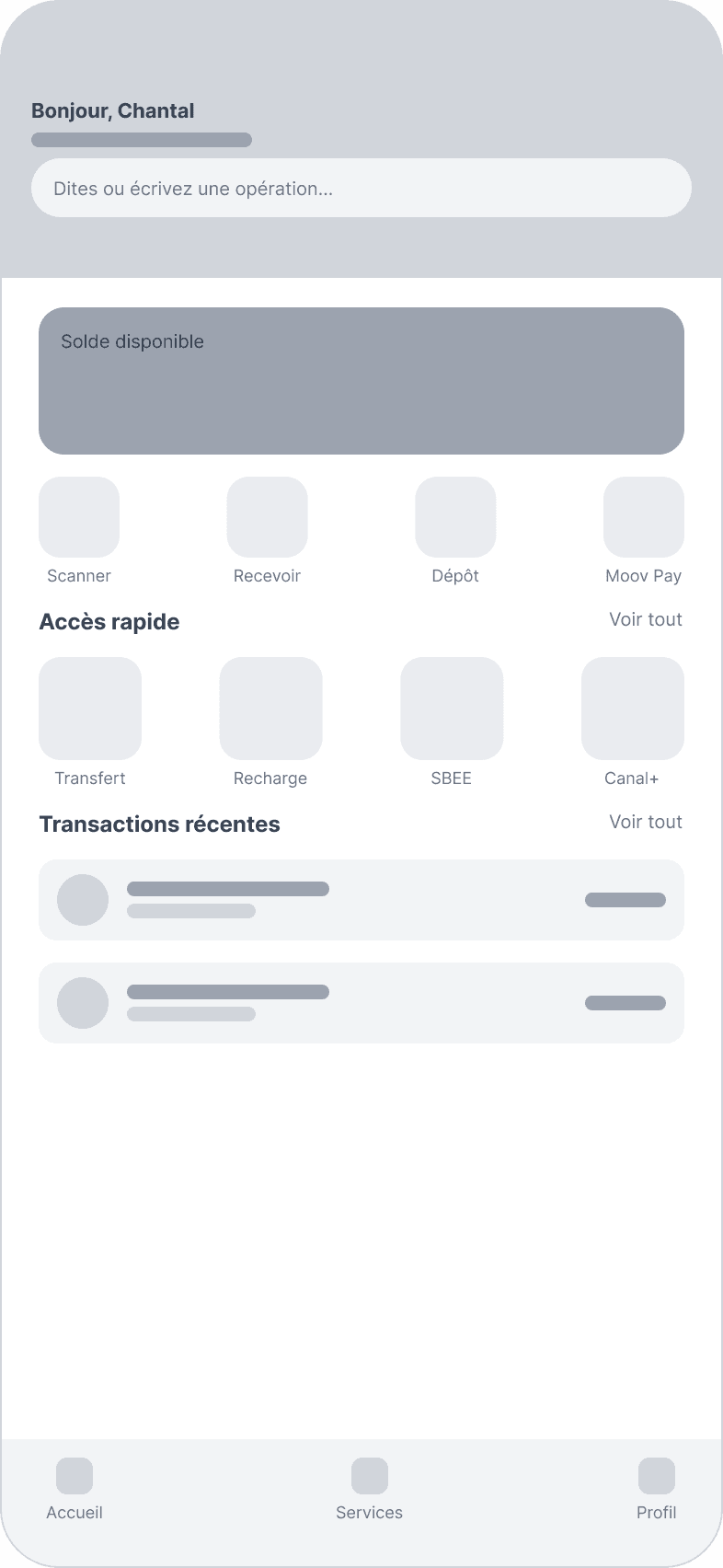
Repeats the flaw found in the audit, an oversized bar at the top of the screen, and pushes the balance down. Less natural for voice.
The assistant journey, in low fidelity
From tapping the microphone to the confirmation, every screen follows the same rule: the assistant understands and suggests, and the user keeps the decision.
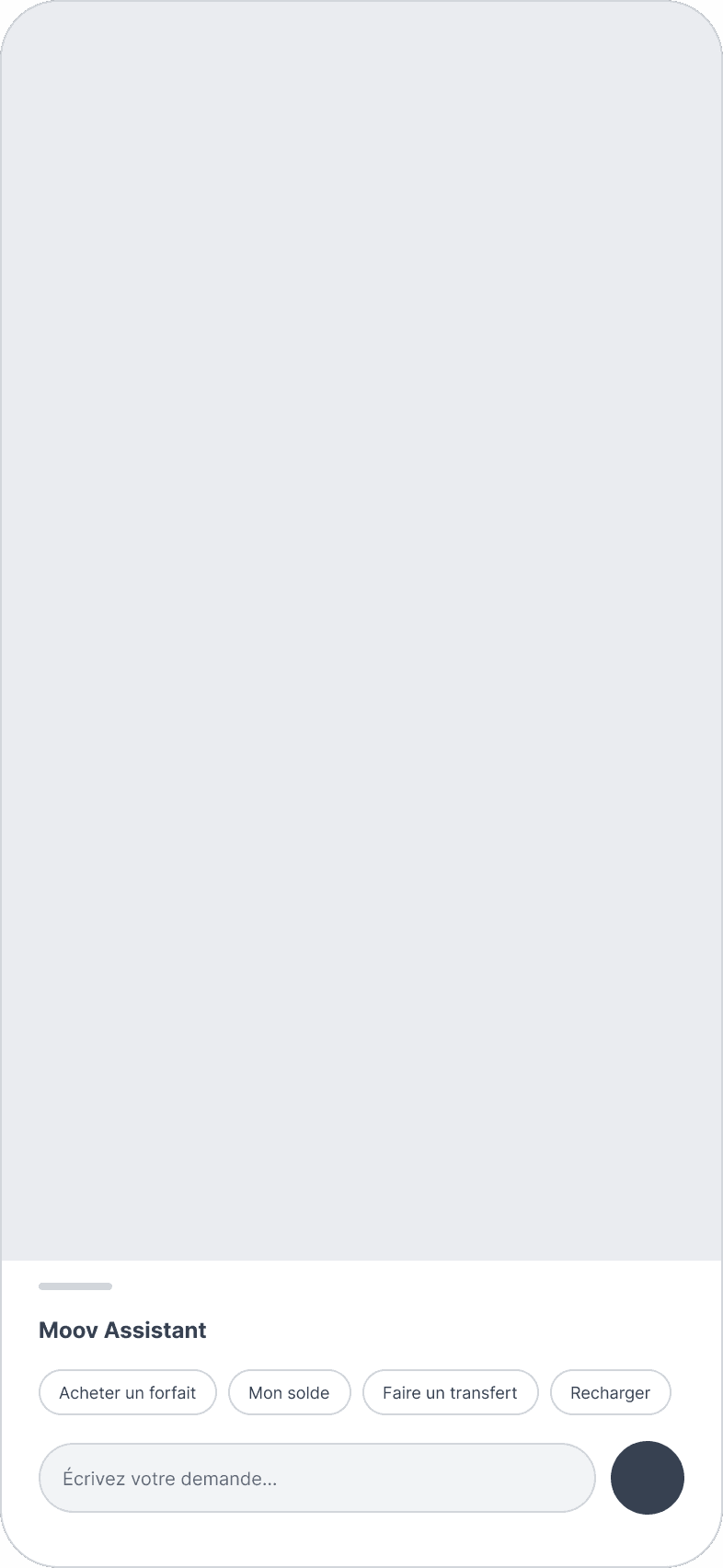
WIREFRAME · 01 OPENING
A bottom sheet over the home screen: the user keeps their context. Suggestion chips for those who don't know what to say, with the microphone as the main action.
DESIGN
A home screen organized like a financial dashboard
Money → action → verification → discovery → marketing. Same visual identity, new hierarchy.
Before
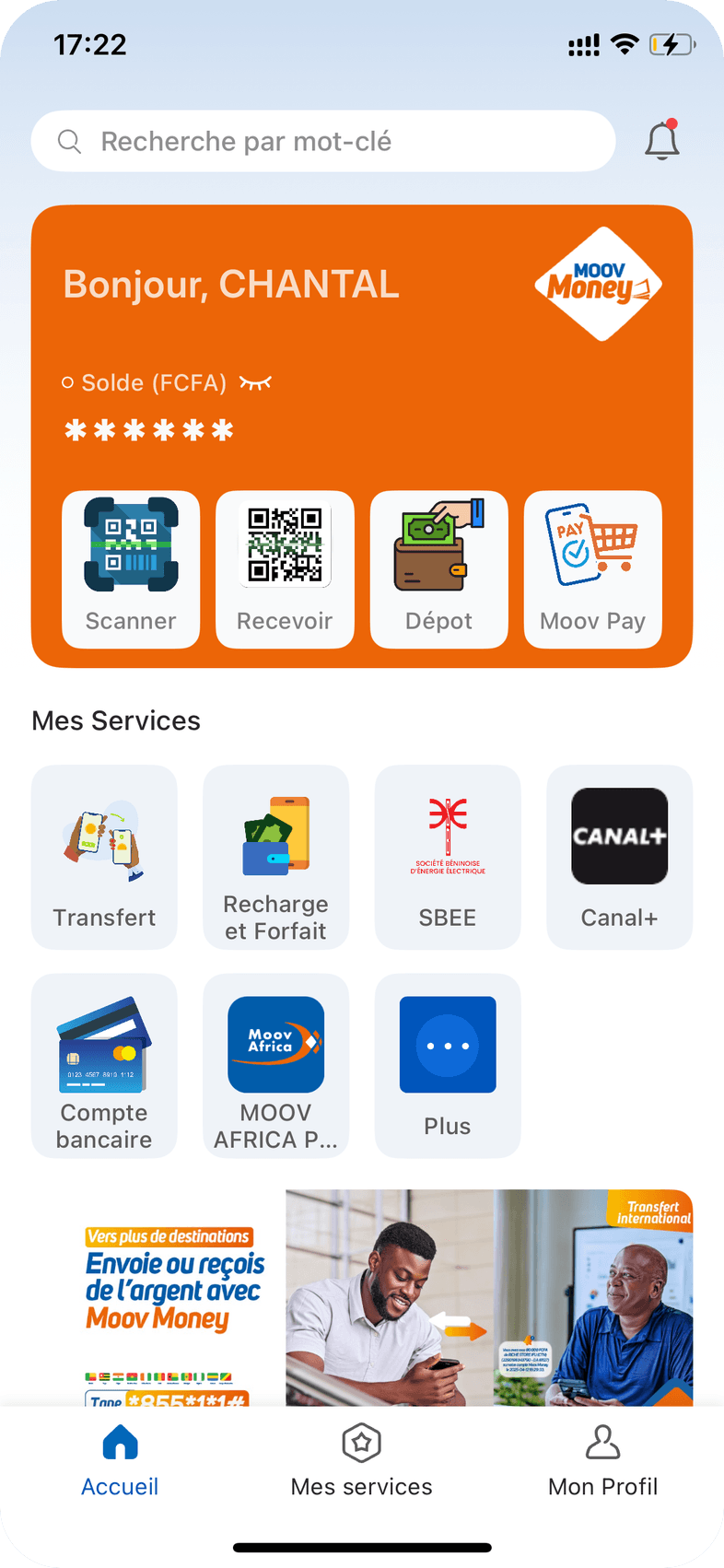
After
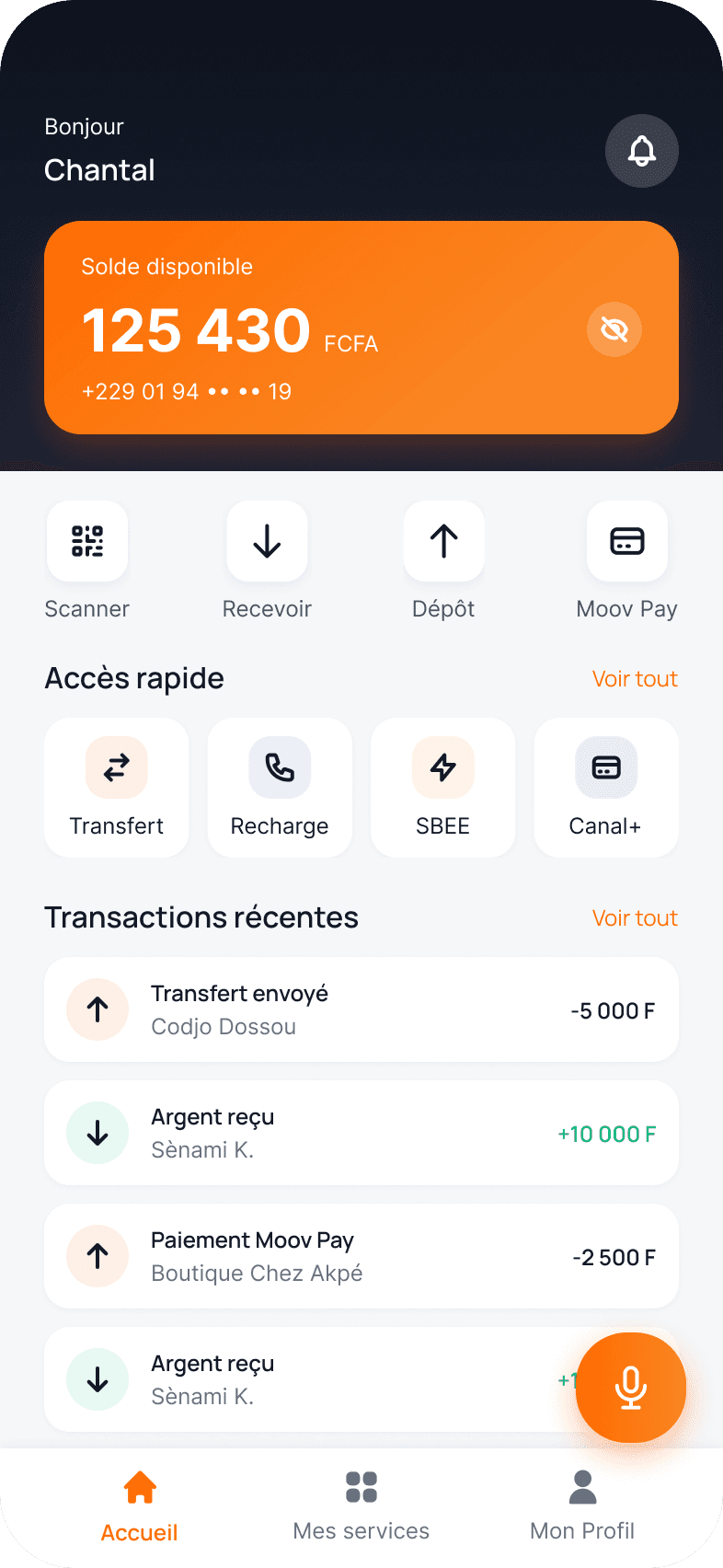
- Search bar removed from the top of the screen, the balance comes first
- Main actions as simple icons instead of busy illustrations
- “Quick access”: 4 priority services instead of 7, with no truncated names
- Recent transactions visible right on the home screen
- Large ad banner removed from the main area
- Moov Assistant one tap away from the home screen
An integrated assistant, not a bolted-on chatbot
Four decisions shape Moov Assistant, each one serving the user's control:
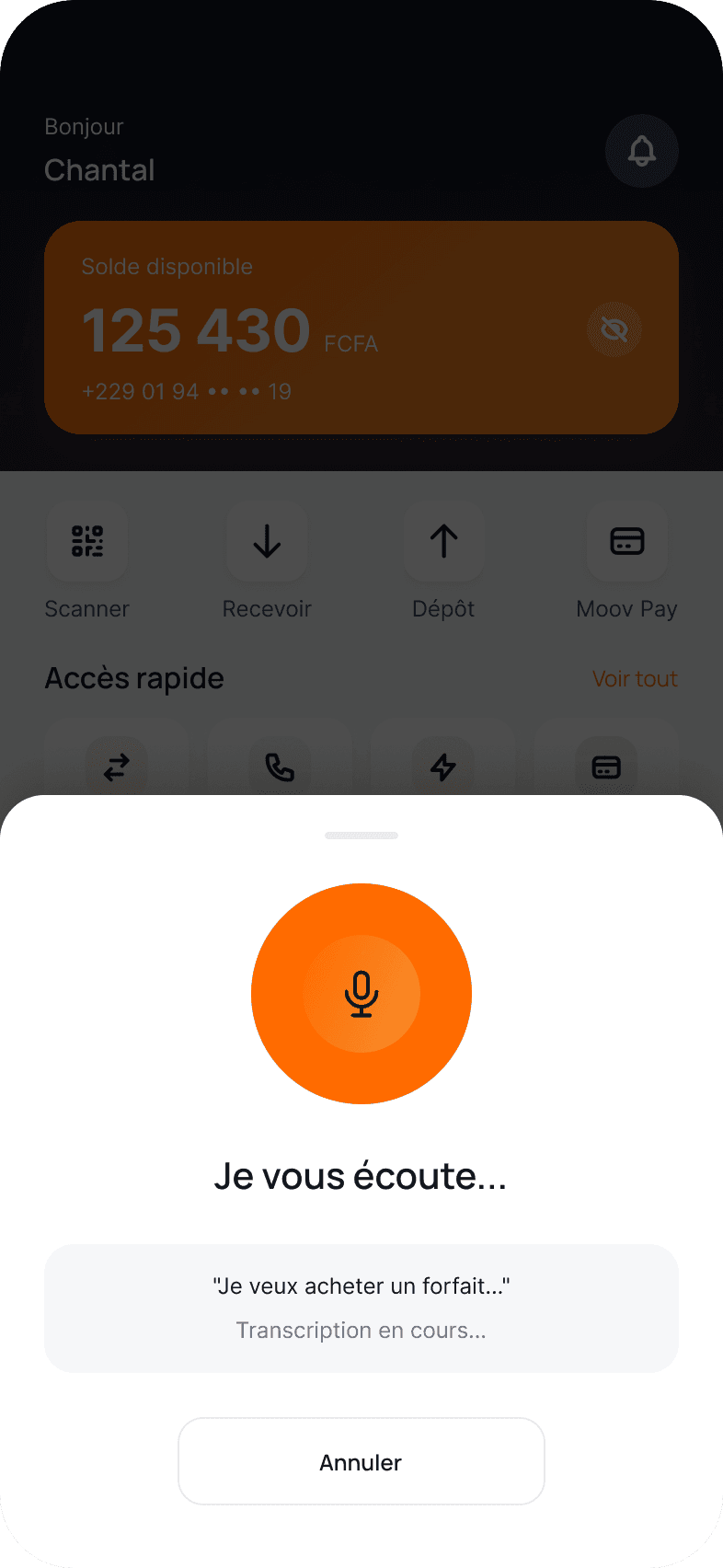
Decision 1
Show what the AI understood
The transcription appears live while listening. The user checks it before any action, and the assistant moves on by itself, without a tap.
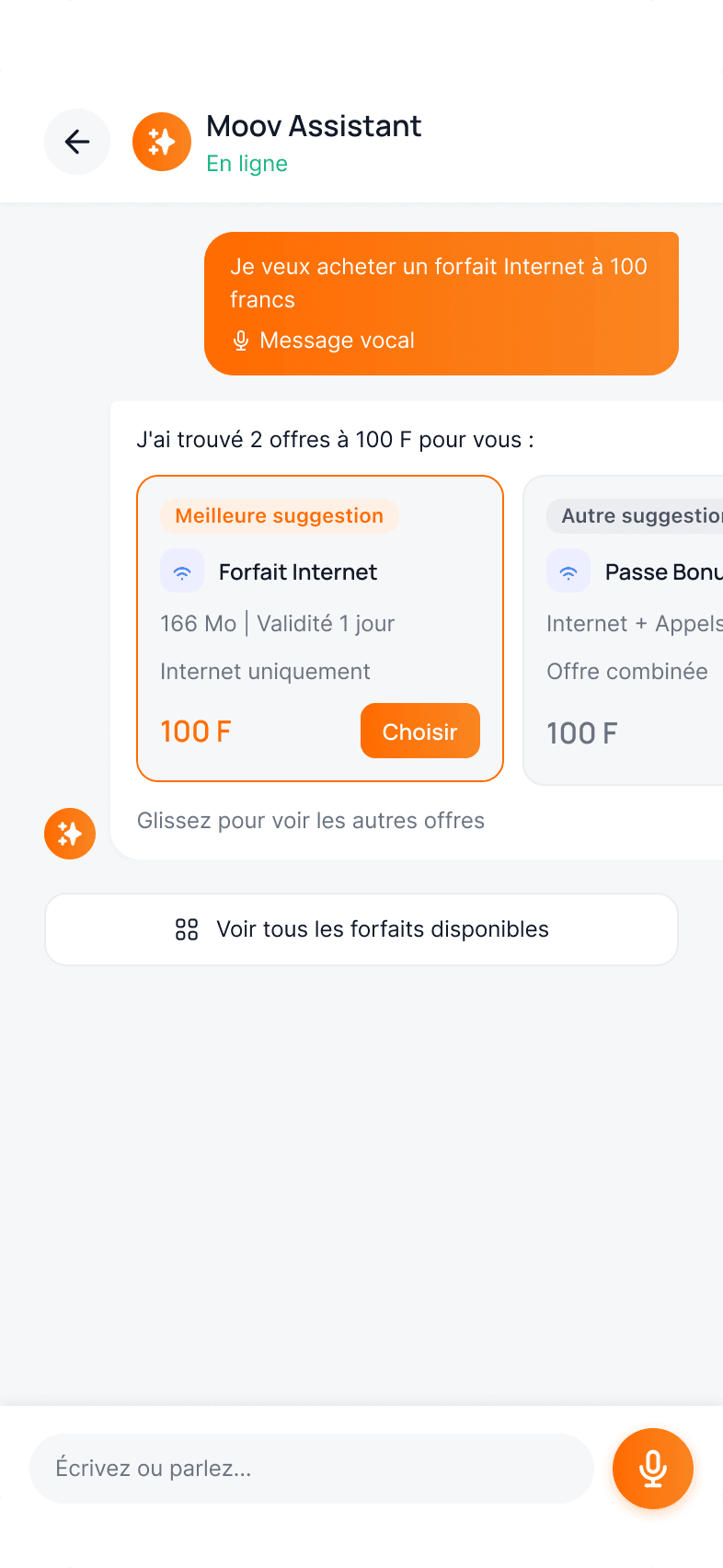
Decision 2
Suggest, don't impose
“A 100 franc bundle” can mean several offers: the best one is highlighted, while the alternatives and the full catalog stay available.
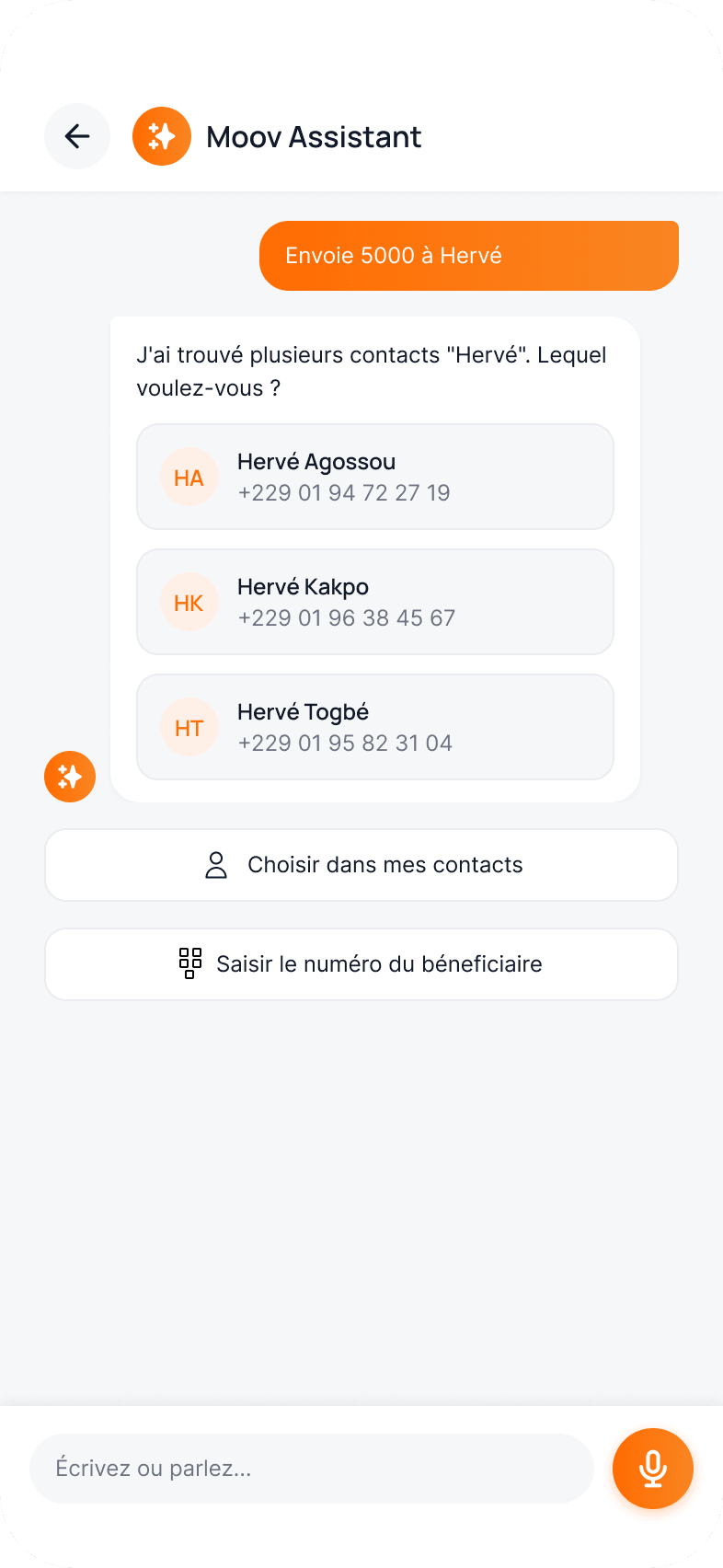
Decision 3
Resolve ambiguity with a question
Three “Hervé” in your contacts? The assistant asks which one instead of guessing, with manual entry always available.
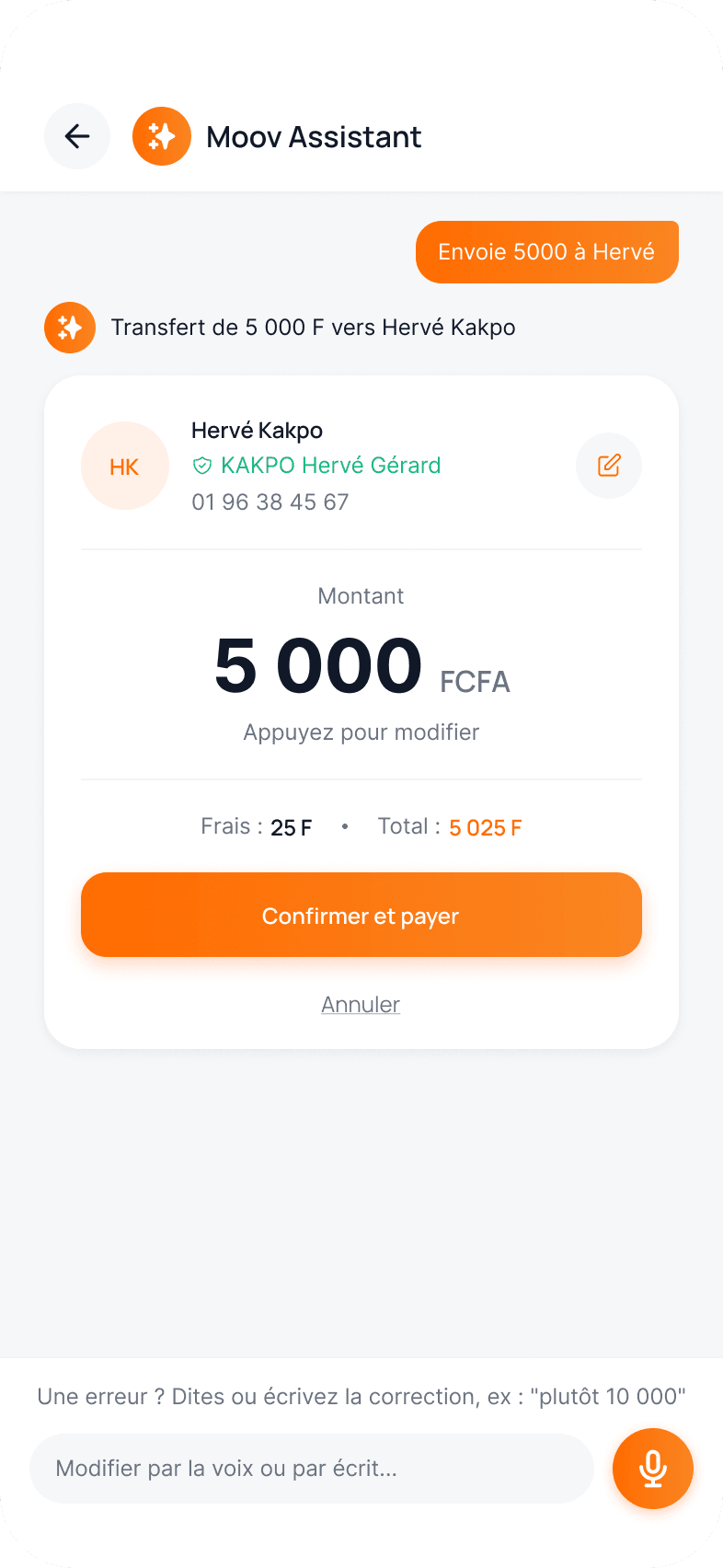
Decision 4
Confirm who and how much, and allow corrections
The name registered with the operator prevents sending to the wrong person. The amount can be corrected with the pencil or by voice, without starting over.
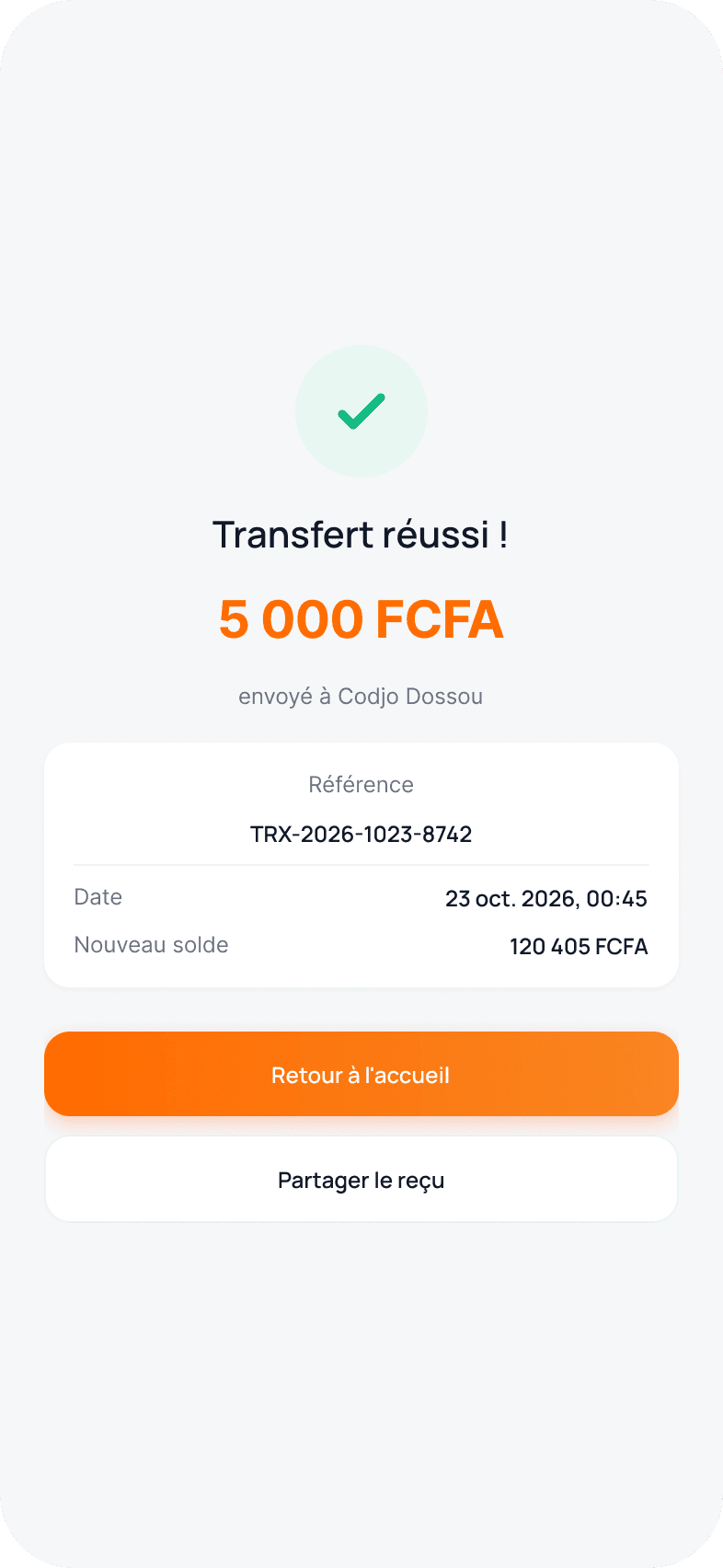
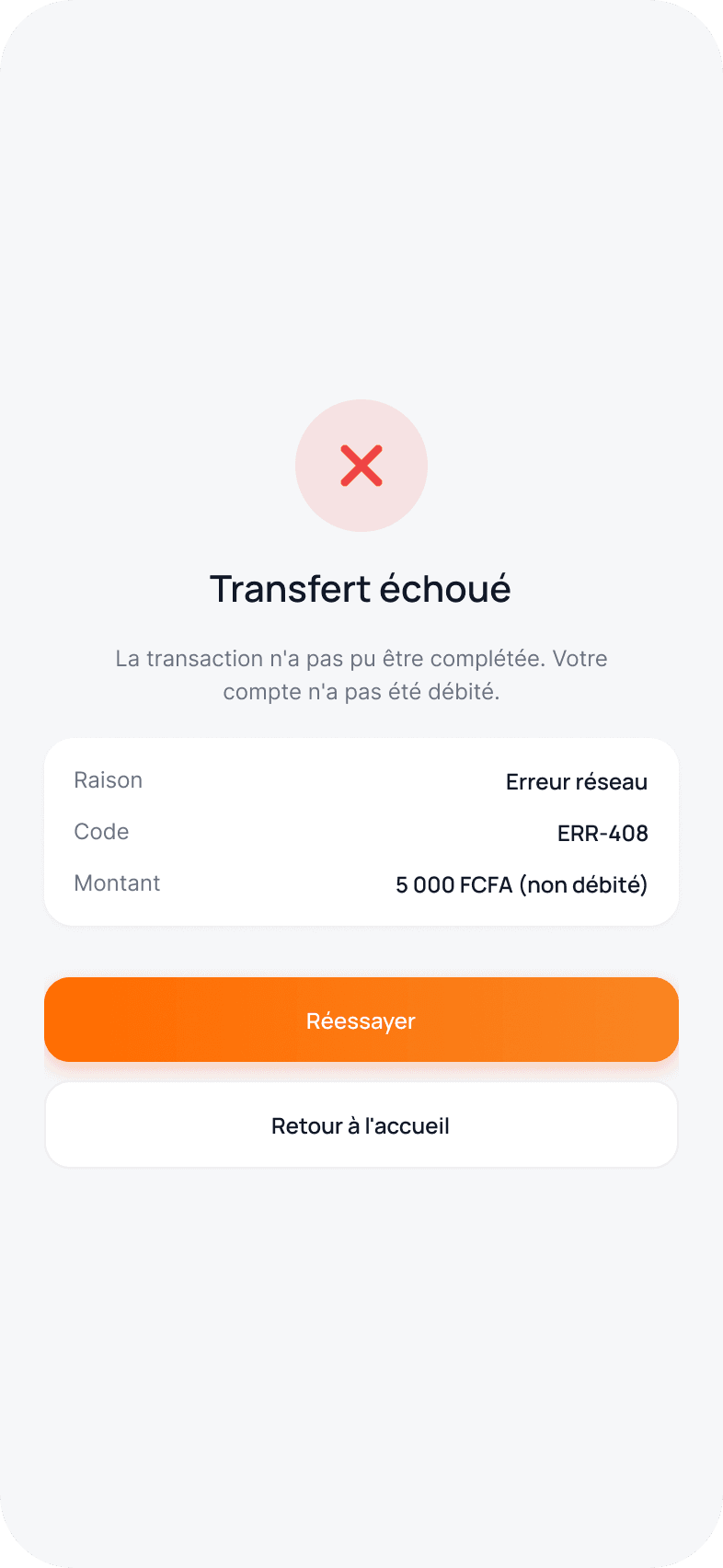
Only the actual result counts
Success is only shown after the operator responds. A failure clearly says that nothing was debited, and the PIN stays separate from voice.
Success
Failure
- Explicit confirmation before any financial transaction
- PIN every time, never replaced by voice
- Planned states: loading, success, failure, insufficient balance, pending
- Ambiguous requests handled with a question, never with a guess
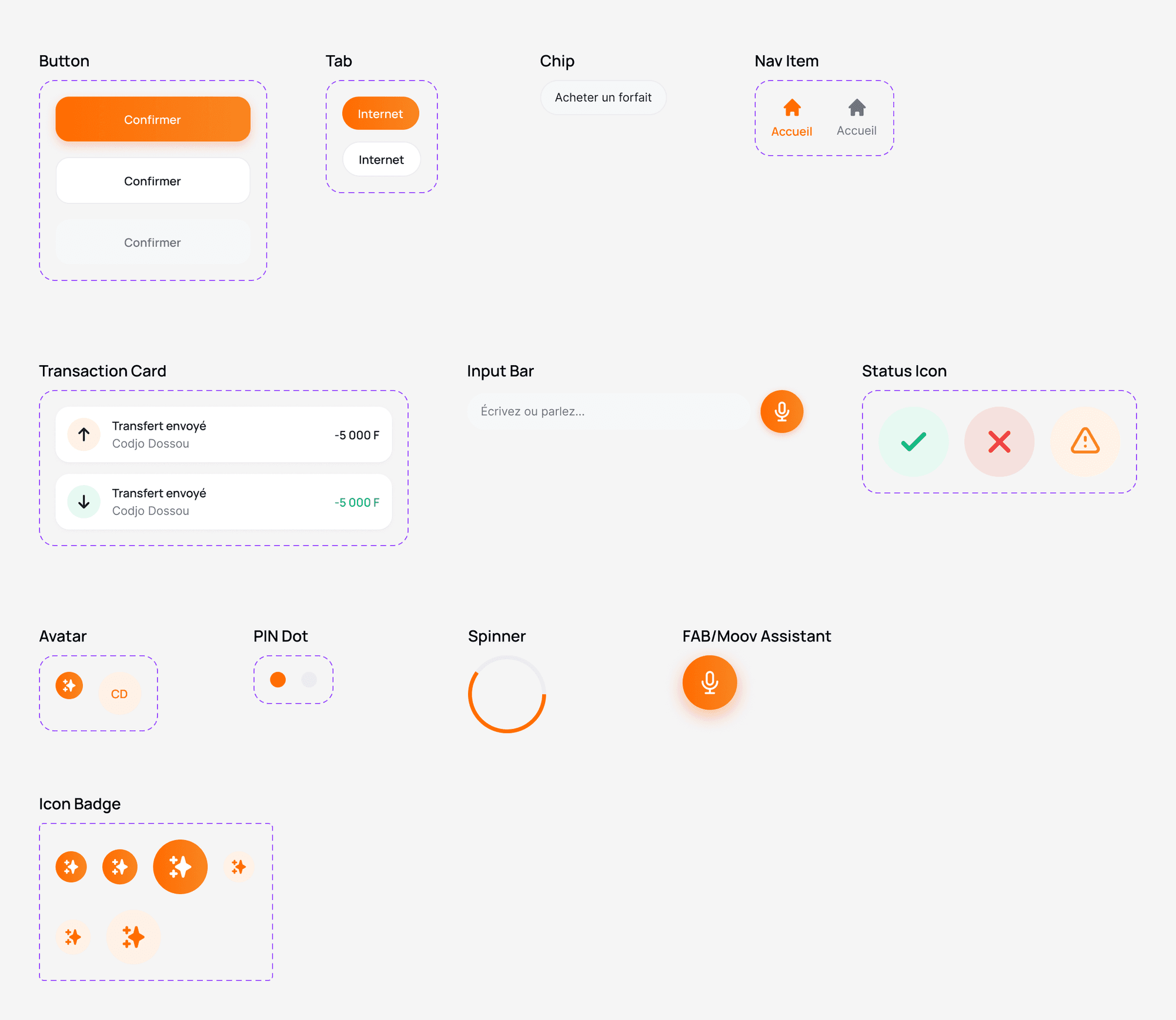
Foundations built to scale
Two-tier tokens (primitives and semantics) with light and dark modes, components with variants and properties, and a testable prototype covering the happy paths and the errors.
Inter carries the body text and amounts, Manrope the headings and labels.
75+
variables: colors, spacing, radii
13
text styles, plus 4 shadow styles
12
components with variants and properties
9
testable prototype flows
Colors
- Accent · accent-primary#FF6B00
- orange-50#FFF0E7
- gray-950#0E1222
- Text · text-primary#111827
- text-tertiary#4B5563
- text-secondary#6B7280
- Border · border-default#EAECF0
- Background · bg-secondary#F6F7F9
- Success · green-500#10B981
- green-50#E7F9F2
- yellow-50#FFF5E7
- blue-50#EAF0FF
SPECIFICATIONS
Interaction rules for the development team
I documented the assistant's expected behavior. The figures are design targets, to be validated through testing and against technical constraints.
Six non-negotiable principles
Voice prepares, the PIN approves
Speech recognition is never used for authentication. Every financial transaction requires the PIN.
Never act on an ambiguous transcription
If a parameter is missing or confidence is low, the assistant asks a closed question instead of guessing.
Show what was understood
The transcription and the interpretation are always shown before any suggested action.
Always a manual way out
Every assistant screen offers a standard path: contacts, manual entry, catalog, cancel.
Only the actual result counts
Success is only shown after the operator confirms. Otherwise: failure, or pending with a notification.
Voice stays optional
Everything that can be said can also be typed or done by touch. No feature is voice-only.
Supported intents (V1)
Prices, balances and offers always come from the operator's system, never from the model.
| Intent | Example | If missing or ambiguous | Confirmation |
|---|---|---|---|
| Money transfer | “Send 5000 to Hervé” | “How much?” or a list of matching contacts, plus manual entry | Summary card + PIN |
| Buying a bundle | “Internet bundle for 100 francs” | Best offer, alternatives and full catalog | Summary card + PIN |
| Data balance | “How much data do I have left?” | Not applicable | None (read only) |
| Airtime top-up | “Top up 500 on my number” | “For which number?” | Summary card + PIN |
| Opening a service | “Pay my SBEE bill” | List of similar services | Opens the standard flow |
Intent: Money transfer
- Example
- “Send 5000 to Hervé”
- If missing or ambiguous
- “How much?” or a list of matching contacts, plus manual entry
- Confirmation
- Summary card + PIN
Intent: Buying a bundle
- Example
- “Internet bundle for 100 francs”
- If missing or ambiguous
- Best offer, alternatives and full catalog
- Confirmation
- Summary card + PIN
Intent: Data balance
- Example
- “How much data do I have left?”
- If missing or ambiguous
- Not applicable
- Confirmation
- None (read only)
Intent: Airtime top-up
- Example
- “Top up 500 on my number”
- If missing or ambiguous
- “For which number?”
- Confirmation
- Summary card + PIN
Intent: Opening a service
- Example
- “Pay my SBEE bill”
- If missing or ambiguous
- List of similar services
- Confirmation
- Opens the standard flow
Request lifecycle and target timings
Idle → listening → transcription → interpretation → clarification if needed → suggestion → confirmation → PIN → processing → result.
| Rule | Target | Behavior |
|---|---|---|
| Automatic end of listening | 1.5 s of silence | The transcription freezes and interpretation starts without any user action. |
| Listening with no voice detected | 8 s | “I didn't hear anything” message, microphone offered again, text field highlighted. |
| Assistant response | < 2 s | Beyond that, a “Searching…” indicator so it doesn't feel stuck. |
| Operator processing | < 10 s | Beyond that, a “Transaction pending” screen with a reference and an upcoming notification. |
| Voice correction | Before the PIN | The confirmation card updates in place, without restarting the journey. |
| PIN | 3 attempts | After 3 errors, temporary lock; duration to be defined with the operator (assumption). |
Rule: Automatic end of listening
- Target
- 1.5 s of silence
- Behavior
- The transcription freezes and interpretation starts without any user action.
Rule: Listening with no voice detected
- Target
- 8 s
- Behavior
- “I didn't hear anything” message, microphone offered again, text field highlighted.
Rule: Assistant response
- Target
- < 2 s
- Behavior
- Beyond that, a “Searching…” indicator so it doesn't feel stuck.
Rule: Operator processing
- Target
- < 10 s
- Behavior
- Beyond that, a “Transaction pending” screen with a reference and an upcoming notification.
Rule: Voice correction
- Target
- Before the PIN
- Behavior
- The confirmation card updates in place, without restarting the journey.
Rule: PIN
- Target
- 3 attempts
- Behavior
- After 3 errors, temporary lock; duration to be defined with the operator (assumption).
TEST PLAN
Validating the assistant before development
The tests have not been run yet. I prepared a moderated test on the Figma prototype, in Cotonou and Porto-Novo, to check one thing: does the assistant save time without ever making people lose control?
- 1
What we want to learn
- Do people understand they can talk to the app?
- Do they trust the summary?
- Do they know how to correct a mistake?
- Is the home screen clearer than the current one?
- 2
8 participants, aged 18 to 55
4 daily Moov Money users, 4 less comfortable with reading and writing. Cotonou and Porto-Novo, Android and iPhone.
- 3
30 min, in person
Think-aloud on the prototype, tasks in alternating order, SUS questionnaire and a trust score. Comparison with the current app on 2 tasks.
Test scenarios
| # | Scenario given to the participant | Journey tested | What we observe |
|---|---|---|---|
| T1 | “Your cousin Hervé is asking you for 5,000 F. Send it.” | Voice transfer, ambiguous contact | Choosing the right Hervé, reading the verified name, total time |
| T2 | “You made a mistake, it was 10,000 F. Fix it before paying.” | Voice or pencil correction | Method chosen, success without starting over |
| T3 | “Buy an internet bundle for 100 F.” | Voice bundle and suggestions | Understanding of the best offer versus the alternatives |
| T4 | “Do the same thing without speaking.” | Standard bundle or transfer | Discovery of the manual exits |
| T5 | “The transfer didn't go through. What happened to your money?” | Failure screen | Understanding that nothing was debited |
#: T1
- Scenario given to the participant
- “Your cousin Hervé is asking you for 5,000 F. Send it.”
- Journey tested
- Voice transfer, ambiguous contact
- What we observe
- Choosing the right Hervé, reading the verified name, total time
#: T2
- Scenario given to the participant
- “You made a mistake, it was 10,000 F. Fix it before paying.”
- Journey tested
- Voice or pencil correction
- What we observe
- Method chosen, success without starting over
#: T3
- Scenario given to the participant
- “Buy an internet bundle for 100 F.”
- Journey tested
- Voice bundle and suggestions
- What we observe
- Understanding of the best offer versus the alternatives
#: T4
- Scenario given to the participant
- “Do the same thing without speaking.”
- Journey tested
- Standard bundle or transfer
- What we observe
- Discovery of the manual exits
#: T5
- Scenario given to the participant
- “The transfer didn't go through. What happened to your money?”
- Journey tested
- Failure screen
- What we observe
- Understanding that nothing was debited
Success criteria
| Metric | Measure | Threshold |
|---|---|---|
| Task success | Task completed without moderator help | ≥ 85% on T1 to T4 |
| Unintended transactions | Payment approved by mistake | 0, blocking criterion |
| Voice transfer time | From tapping the floating button to success | Lower than the current standard transfer |
| Trust before payment | “I know exactly who I'm sending to and how much”, rated 1 to 5 | Average ≥ 4 |
| Overall usability | SUS questionnaire | Score ≥ 75 |
| Understanding failure | Correct answer to “Were you debited?” | 100% |
Metric: Task success
- Measure
- Task completed without moderator help
- Threshold
- ≥ 85% on T1 to T4
Metric: Unintended transactions
- Measure
- Payment approved by mistake
- Threshold
- 0, blocking criterion
Metric: Voice transfer time
- Measure
- From tapping the floating button to success
- Threshold
- Lower than the current standard transfer
Metric: Trust before payment
- Measure
- “I know exactly who I'm sending to and how much”, rated 1 to 5
- Threshold
- Average ≥ 4
Metric: Overall usability
- Measure
- SUS questionnaire
- Threshold
- Score ≥ 75
Metric: Understanding failure
- Measure
- Correct answer to “Were you debited?”
- Threshold
- 100%
BLOCKING CRITERION
Zero payments approved by mistake. A single one is enough to conclude that the assistant isn't ready.
Assumptions to validate
Formulated during design, to be confirmed or disproved through testing and with the operator.
H1 · The floating button gets discovered
Without explanation, at least 6 participants out of 8 identify the button as the assistant.
H2 · The verified name reassures
Showing the name registered with the operator reduces hesitation before payment.
H3 · Voice is preferred for transfers
Users less comfortable with reading and writing spontaneously choose voice.
H4 · Moving transactions up is useful
Participants check a recent transfer faster than in the current app.
H5 · Undocumented screens
Content of the Profile tab and PIN lock rules to be confirmed with Moov Africa.
H6 · Recognition quality
Sufficient understanding with local accents and street noise, to be measured technically.
Final design
FINAL THOUGHTS
In a financial app, AI should reduce effort, not vigilance.
What I learned: every voice shortcut must keep a human checkpoint: voice prepares, the PIN approves. Local context changes the design: Beninese number formats, frequent namesakes in contacts, a name verified with the operator. And placing the assistant was an architecture decision before it was a visual one: a dedicated tab or a command bar would have broken the hierarchy the audit had validated.
Next steps: run the test plan with its blocking criterion; measure speech recognition quality with local accents and noise; explore Fon and Yoruba, as well as reading the summary aloud; validate the undocumented screens (profile, PIN lock) with the operator.
Limitations: a concept project, not affiliated with Moov Africa, with fictitious data. No user testing has been carried out yet: the decisions and target timings remain assumptions to be validated.